What is SA302 Form? A Guide to Tax Calculations
An SA302 is an official document issued by HM Revenue and Customs (HMRC) that provides a detailed breakdown of an individual’s declared income and the corresponding tax calculations for a specific tax year.
It serves as definitive, state-backed evidence of earnings and tax liabilities for self-employed individuals, sole traders, and company directors across the United Kingdom.
What is SA302 form?
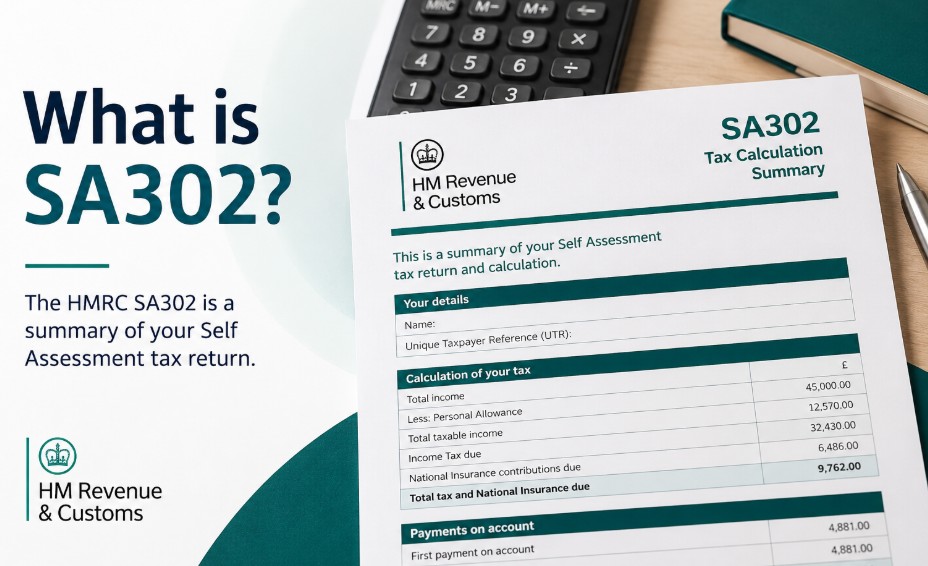
An HMRC SA302 form is the official statement that acts as a definitive certificate of your declared income and tax calculations for any given financial year.
When you submit your self-assessment tax return to HM Revenue and Customs, the government processes your figures and issues this summary document to show exactly how much money you earned and how much tax you owe based on those earnings.
For anyone operating outside the traditional PAYE payroll system, this sheet is the primary method used to validate financial standing to external institutions.
The terminology surrounding this document can sometimes cause confusion because it is officially titled a Tax Calculation Summary on the online portal, yet historically and commercially, it is still universally referred to as the SA302 form.
In practice, when a bank, mortgage lender, or financial provider asks to see your SA302 document, they are asking for the official printout or digital export of this calculation page. It proves that your stated business profits or personal income streams have been formally declared to the state.
Is an SA302 the same as a tax calculation?
Yes, an SA302 is precisely the official name for your final HMRC tax calculation summary. While many small business owners search for these two terms separately, they refer to the exact same piece of financial data.
The term SA302 is an internal HMRC form code that became the industry-standard shorthand among mortgage brokers, banks, and accountants across the UK.
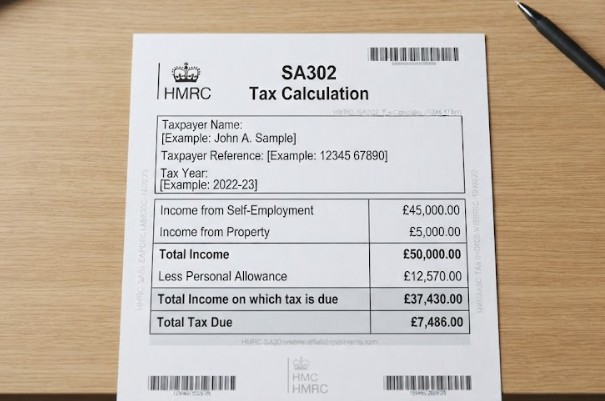
What does an HMRC SA302 look like?
An HMRC SA302 is a highly structured, line-by-line financial ledger that itemises your precise income streams, tax-free allowances, progressive tax band splits, and total legal tax liabilities for a specific tax year.
As of 2026, whether you pull the file directly from the digital Government Gateway or print it from approved commercial accounting software, the document contains specific, identifiable sections:
-
Personal Identification Data: Your full name, Unique Taxpayer Reference (UTR) number, and the specific tax year being assessed are displayed clearly at the very top of the page.
-
Summary of Income Streams: A granular breakdown of every declared income source, itemising your net trading profits, pay from employment, dividends from limited companies, income from property rentals, and any capital gains or bank interest.
-
Deductions and Personal Allowance: A line showing your tax-free Personal Allowance allocation and any other applicable reliefs deducted from your total income to arrive at your net taxable income. If your situation differs, this figure will change depending on your status within the wider list of tax codes.
-
The Tax Calculation Matrix: A progressive breakdown showing exactly how your income was split across the basic, higher, and additional tax bands, alongside any National Insurance contributions (Class 2 and Class 4 liabilities).
-
Final Tax Liability: The absolute total amount of tax due for that specific year, minus any tax already paid at source.
What is the difference between a tax return and an SA302?
A common pattern among newly self-employed individuals is confusing the act of filing taxes with the document produced as a result. The distinction lies entirely in the input-versus-output relationship of self-assessment:
-
The Self Assessment Tax Return (SA100): This is the initial form containing the raw data and financial figures that you, or your designated accountant, fill out and submit to HMRC. It is your statement of what you believe you earned and spent over the financial year.
-
The SA302 Tax Calculation: This is the official output document generated by HMRC after your return has been received and processed. It is the formal calculation showing how the government has assessed your numbers and finalized your legal tax position. You cannot have an SA302 without first completing and filing your SA100 return.
Who Needs an SA302?
The SA302 form is primarily required by any individual who earns income outside of standard PAYE employer payrolls and needs to provide independent, verified proof of their earnings to third-party institutions.
While company employees receive monthly payslips and an annual P60 to prove their income, independent operators lack these standard employer-backed documents. This makes the SA302 their primary proof of earnings.
The individuals who most frequently require this document include:
-
Sole traders running independent, unincorporated small businesses.
-
Registered partners within a business partnership structure.
-
Freelancers, contractors, and gig-economy workers.
-
Company directors of small limited companies who take income through a combination of director salaries and share dividends.
-
Individuals with substantial secondary income streams, such as landlords managing residential or commercial property portfolios.
Is It Only for the Self-Employed?
No, an SA302 is not exclusively reserved for the self-employed; any traditional PAYE employee who files a Self Assessment return for investments, property, or high-income charges will have one generated by HMRC.
A traditional employee who is paid predominantly via PAYE may still need an SA302 if they are required to file a self-assessment tax return for other reasons.
For instance, if an employee earns untaxed dividend income from investments, receives significant rental income from a buy-to-let property, or needs to declare high-income child benefit charges, they must complete a tax return.
Consequently, HMRC will generate an SA302 for them, blending their employment income with their personal investment earnings into one single calculation summary.

Is an SA302 officially accepted as proof of income?
Yes, the SA302 is universally accepted as the absolute gold standard for independent income verification by UK banks, building societies, mortgage underwriters, and government departments.
The most common real-world trigger for needing this document is a mortgage application. Because sole trader profits and limited company dividend payouts can fluctuate significantly year-on-year, underwriting teams use the SA302 to assess your long-term earnings stability.
Lenders typically aggregate your net profit figures over a rolling two-to-three-year period to determine your maximum borrowing capacity and calculate affordability safely.
Beyond mortgages, you may also need to provide this document when applying for substantial business loans, commercial vehicle leases, or when attempting to secure a tenancy agreement on a rental property.
What is the difference between an SA302 and a Tax Year Overview?
The difference between an SA302 and a Tax Year Overview is that the SA302 displays the calculations of what you owe, whereas the Tax Year Overview acts as a formal receipt proving you have actually paid it.
The difference comes down to calculation versus verification. This dual-document strategy allows fraud prevention teams to verify that the tax figures you are showing them match the actual tax position settled with the state via the official UK government bank account tax collection system.
| Feature / Document Metric | HMRC SA302 (Tax Calculation Summary) | HMRC Tax Year Overview |
| Primary Purpose | Shows breakdown of declared income & how tax was computed. | Confirms total tax due, amounts paid, and outstanding balances. |
| Who Generates It | Automatically calculated by HMRC or commercial software. | Generated directly within the HMRC portal. |
| Key Figures Displayed | Net profits, dividends, salary, deductions, tax bands. | Total tax bill, payments received, refunds, dates settled. |
| Lender Requirement | Verifies your organic earning capacity and stability. | Proves that the tax owed was fully paid and cleared. |
How to get SA302 from HMRC?
To get an SA302 from HMRC, you must log into your official online Government Gateway tax account or request the calculation summary export directly through your accountant’s commercial filing software.
If you filed your self-assessment tax return directly through the official government portal using your personal credentials, you can access and print your documents natively at any time.
-
Navigate to the official GOV.UK portal and log in using your Government Gateway user ID and secure password.
-
Select the Self Assessment option from your main account dashboard.
-
Click through to the More Self Assessment details section.
-
Locate and select the menu option marked View your tax return options.
-
Choose the specific tax year you require from the available historical menu.
-
Click the button to View return for that selected year.
-
Locate the link labeled View calculation within the navigation menu.
-
Scroll to the bottom of the page and click Print your full calculation to generate your document.
How to download SA302 as a PDF?
Once you have navigated to the final calculation view using the steps above, you can easily save the page as an official digital document. Instead of physically printing the page to paper, click the Print your full calculation link to open your web browser’s print options menu.
Within the destination dropdown menu, change the target device from your local physical printer to Save as PDF.
Ensure that all background graphics are turned on in your settings so that the official HMRC layout elements render correctly, then save the file directly to your secure device. This electronic file can be emailed straight to your mortgage broker or loan provider.

How to print Tax Year Overview?
To print your Tax Year Overview, navigate to the View Account section under your Government Gateway Self Assessment tab, select the matching tax year, and click Print your Tax Year Overview.
-
Go back to your main Self Assessment landing page on the Government Gateway.
-
Look for the section labeled Self Assessment overview.
-
Click the specific link titled View account.
-
Select the Tax years option from the navigation options.
-
Choose the exact tax year that matches the SA302 calculation you just downloaded.
-
Click Go to display the financial transactions for that period.
-
Select the option to Print your Tax Year Overview and save it as a PDF using the same browser print-to-file technique described above.
How long does it take to get an SA302 from HMRC?
An online-submitted SA302 is generated automatically and is ready to download within 24 to 72 hours, whereas a physical paper-filed tax return can take several weeks to months to process.
However, if you are one of the remaining UK operations that submits a traditional paper tax return via the post, the processing timelines are substantially longer.
It can take anywhere from several weeks to months during peak winter processing windows for HMRC staff to manually input your physical documentation and mail a paper copy back to your address.
What updates are introduced by Making Tax Digital (MTD)?
Under Making Tax Digital for Income Tax, eligible individuals are transitioning away from single annual SA302 forms toward live, quarterly digital stream updates submitted via MTD-compatible software.
As the roll-out of Making Tax Digital (MTD) for Income Tax Self Assessment progresses, the way self-employed taxpayers interact with HMRC is shifting. For business operators and landlords with gross income exceeding £50,000, tax updates must be submitted quarterly.
While the traditional annual SA302 remains the final processing milestone, high-street mortgage lenders (including Lloyds, NatWest, Barclays, and HSBC) are increasingly utilizing direct MTD software compliance reports and digital API streams to verify a business’s year-to-date performance before formal year-end documentation is generated.
Summary
Navigating self-employed finance requires a structured approach to record-keeping. To ensure your next financial application or mortgage process runs smoothly, adopt these practical steps:
-
Log into your Government Gateway portal well ahead of your application date to verify that your access credentials are active.
-
Download and save both the Tax Calculation PDF and the corresponding Tax Year Overview for the last three complete financial years.
-
Verify that the net tax due figure shown on your SA302 matches the payment amounts recorded on your Tax Year Overview down to the penny.
-
If your tax return was submitted via commercial software, contact your accountant immediately to obtain the software-generated equivalents of your forms.
Verification Statement: This guide is fully verified against current official HMRC self-assessment guidelines and UK tax protocols.
FAQ
Can I download an SA302 form if I haven’t filed my taxes yet?
No. HMRC cannot compute a tax calculation without receiving your financial data first. You must fully complete and submit your self-assessment tax return for the relevant year before an SA302 can be generated by the system.
How many years of SA302 calculations do UK mortgage lenders require?
Most mainstream UK banks and building societies require you to provide two to three consecutive years of SA302 calculations alongside matching Tax Year Overviews to verify income stability, though specialist lenders may consider applicants with just one year of records.
What should I do if the income figures on my SA302 are completely wrong?
You must submit an official amendment to your self-assessment tax return to correct any errors. Once HMRC processes your updated figures, a corrected SA302 calculation will be generated on your dashboard within 72 hours.
Do I need an SA302 if I am a director of a limited company?
Yes. Because limited company directors determine their own take-home pay via varied combinations of salary and share dividends rather than standard fixed wages, lenders utilize the SA302 to confirm the exact personal income declared to HMRC.
Can I use an SA302 to prove my income for a tenancy agreement?
Yes. Many letting agents and private landlords across the UK accept a downloaded SA302 calculation as valid, official verification that a self-employed applicant earns sufficient income to cover their monthly rent obligations safely.
Does an SA302 show my business expenses?
No. The SA302 displays your final net trading profits after your allowable business expenses have already been deducted from your total turnover on your main self-assessment schedules.
Is there a fee to download or print an SA302?
No. Accessing, downloading, and printing your tax calculations and overviews through your personal Government Gateway account or via an accountant’s filing software is a completely free service provided by HMRC.