How to Create Invoices: A Step-by-Step UK Business Guide
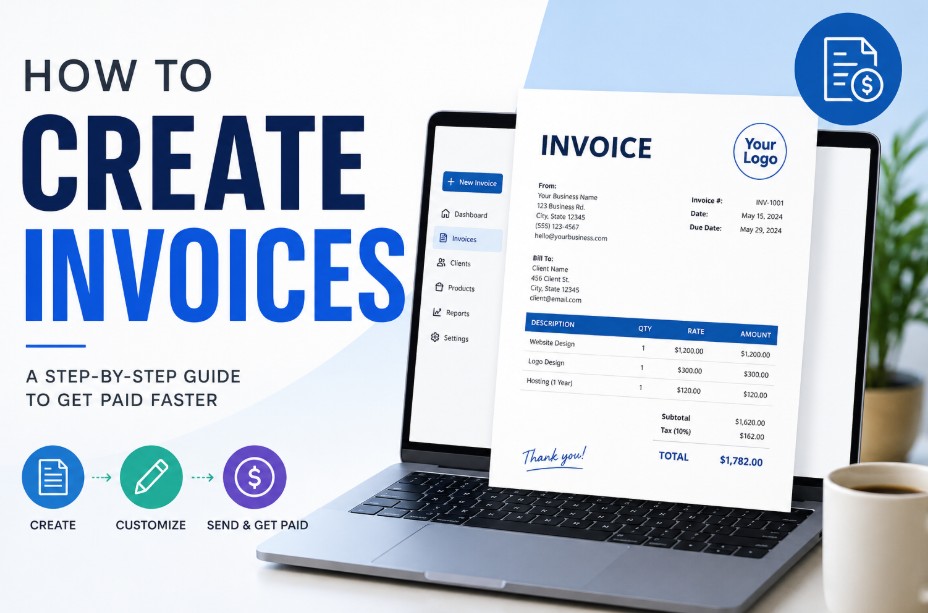
To create a valid invoice, choose a professional template and add your business contact details, company registration or VAT numbers, and the client’s billing address.
Assign a unique, sequential invoice number and include a detailed, itemised list of goods or services with flat costs or tax breakdowns.
State the total balance due, your bank sorting code and account number, and explicit payment terms before exporting the document as a secure, uneditable PDF.
What is an Invoice?
An invoice is an official commercial document issued by a seller (a business or self-employed individual) to a buyer. It details the specific goods supplied or services rendered, itemises the agreed-upon costs, and serves as a formal request for payment.
Beyond functioning as a payment request, an invoice is a critical legal and financial document in the UK.
It forms the primary evidentiary record required by HM Revenue and Customs (HMRC) for calculating your business income, verifying corporate tax metrics, and conducting financial audits.
What are the Types of Invoices?
Depending on your business registration, client type, and transaction stage, you will primarily use one of these three invoice formats:
1. Standard (Non-VAT) Invoice
Used exclusively by self-employed sole traders and small businesses whose turnover falls below the statutory threshold.
If you fall into this bracket, make sure you know how to get a UTR number from HMRC to file your annual tax returns correctly. This standard document contains flat billing figures without any tax breakdowns.
2. Full UK VAT Invoice
Mandatory for any VAT-registered business conducting B2B sales. This document contains complex tax disclosures, including net prices, tax rates per item, and the total value-added tax displayed strictly in GBP.
3. Simplified VAT Invoice
An expedited invoicing tier permitted by HMRC for quick retail or commercial transactions totaling under £250. It requires fewer client details but must still display the total gross balance and the specific tax rate applied.
How to Create Invoices?
You can create invoices manually using a word processor or automatically via automated cloud software.
In the UK, the creation method depends on your tax structure: Sole Traders issue flat-fee documents, VAT-registered entities must provide detailed tax breakdowns per line item, and cash retail transactions under £250 can utilize simplified
Method 1: How to Create Invoices as a Sole Trader?
-
Step 1: Layout Selection. Open your preferred text editor (like Microsoft Word) or a design platform and choose a clean layout. Place the word Invoice boldly at the top.
-
Step 2: Add Identities. Input your trading name, address, and email in the top right header. Directly below, add your client’s official corporate name and accounts payable billing address.
-
Step 3: Establish the Ledger String. Generate the next unique sequential number in your system (e.g., INV-2026-042) and add today’s date along with a clear 30-day due date.
-
Step 4: Draft the Line Items. Create an itemised table. Write descriptive rows detailing the exact work completed, unit numbers, and flat-rate costs. Total these amounts at the bottom without adding tax lines.
-
Step 5: Provide Banking Feeds. Type your bank account details clearly alongside your payment terms at the base of the page. Lock and export the file as a secure PDF.
Method 2: Creating a Full UK VAT Invoice
-
Step 1: Set Up Regulatory Headers. Open your document template and insert your verified 9-digit UK HMRC VAT registration number prominently alongside your corporate registration details.
-
Step 2: Restructure the Cost Table. Format your itemised table to include separate columns for: Net Unit Price (excluding tax), VAT Rate Applied (e.g., 20% or 5%), and Total VAT Amount per line item.
-
Step 3: Detail the Technical Breakdown. For every service row, input the raw cost, apply the correct tax percentage, and calculate the exact tax column total.
-
Step 4: Formulate the Final Balances. At the foot of the invoice, create three separate calculation lines: Total Net Amount, Combined VAT Total (displayed clearly in GBP), and the final Gross Balance Due.
-
Step 5: Financial Security Check. Verify all mathematical calculations manually or via accounting software formulas to prevent ledger errors. Save and finalize as a locked PDF.
Method 3: Creating a Simplified VAT Invoice
-
Step 1: Fast-Track the Header. Choose a compact layout or a retail terminal design template. Ensure your company name, registered address, and HMRC VAT number are listed clearly at the top.
-
Step 2: Input Baseline Tracking. Add a valid, sequential unique identification number and the exact date of the transaction supply. (Client names and addresses can be omitted for simplified profiles under £250).
-
Step 3: List the Purchases. Write a brief, itemised description of the goods or services provided to the buyer.
-
Step 4: Display the Global Tax Rate. Instead of breaking down every individual row’s net costs, display the total gross balance due and state the explicit VAT rate currently applied to the transaction as a whole. Export or print directly.
When is an Invoice Needed for a Business?
A business legally needs an invoice during business-to-business (B2B) transactions, immediately following the delivery of services or physical goods, and for annual tax record-keeping.
UK mercantile law states that a business must provide a valid invoice whenever another commercial customer requests one. A business requires an invoice in several key operational scenarios:
-
Business-to-Business (B2B) Transactions: Under UK mercantile law, you are legally obligated to provide a valid invoice whenever another business customer requests one.
-
Post-Service or Post-Delivery Billing: It is required immediately after completing a project, milestone, or delivering physical goods to establish a legal obligation for the client to pay.
-
Tax and Record Keeping: You must generate and retain copies of all invoices to substantiate your annual tax returns, manage your automated VAT accounting ledger, and maintain clean audit trails.
How Do Invoices Work in the UK?
Invoices work as a four-stage legally binding workflow in the UK: a commercial agreement is formed, a structured financial document is generated, a formal demand transforms the invoice into an active debt, and reconciliation occurs when the buyer clears the balance via bank transfer.
The invoicing process functions as a systematic, legally binding workflow:
-
The Agreement: A business and a client agree on a scope of work, unit pricing, and specific payment terms (such as a standard 30-day window).
-
The Generation: Once the goods are shipped or the service is finalized, the seller generates a structured document containing unique tracking numbers and itemised financial fields.
-
The Demand: The seller issues the invoice to the buyer’s accounts payable department. This action transforms a verbal agreement into an active legal debt obligation.
-
The Reconciliation: The buyer reviews the document, verifies it against internal Purchase Orders (POs), and completes the bank transfer. Once money changes hands, the invoice is marked as “paid” in the financial ledger, and a separate receipt can then be issued as proof of payment.
What Should an Invoice Include?
Under UK company law and HMRC regulations, a compliant invoice must display seven mandatory components: a prominent Invoice header, a unique sequential identification number, the seller’s business name and address, the client’s legal name and address, relevant timestamps (issue and supply dates), an itemised table of costs, and clear banking payment details.
To remain completely compliant with HMRC and UK company law, ensure your document explicitly displays the following structural elements:
-
Clear Document Header: The word Invoice displayed prominently at the top.
-
Unique Identification Number: A chronological, sequential numbering sequence with no numerical gaps.
-
Your Professional Information: Full trading or registered company name, corporate address, contact details, and your official Company Registration Number if you choose to register a company in the UK.
-
Client Identifiers: The official legal name and billing address of the customer being charged.
-
Relevant Timestamps: The exact invoice issue date alongside the specific date the goods or services were supplied.
-
Itemised Cost Table: Clear descriptions of services (e.g., specific line-item metrics instead of vague summaries), quantities, unit prices, and the total gross balance due.
-
Explicit Payment Paths: Your specific bank sorting code, account number, accepted payment methods, and your exact payment deadline.
How to Send an Invoice?
Filing your commercial demand correctly ensures it travels through your client’s accounting pipeline without being delayed:
-
Always Export to Secure PDF: Never email editable layouts like .docx or .xlsx files, as they are vulnerable to accidental layout shifting or unauthorized alterations. Exporting a locked PDF guarantees the recipient views the exact data you compiled.
-
Identify the Accounts Payable Contact: Avoid sending invoices to generic company support channels. Request the direct email address of the client’s internal bookkeeper or dedicated accounting team.
-
Optimize your Email Subject Line: Use a clear, searchable subject line structure so accounts software can categorize it instantly. A professional pattern is: Invoice [Invoice Number] – [Your Business Name] – [Project Name].
-
Include the Purchase Order (PO): If your corporate client issued an authorized PO number prior to starting work, reference this number directly on your document face and paste it within the body of your email to guarantee fast internal authorization.
Late Payments and Credit Risk Management
Under the UK Late Payment of Commercial Debts Act 1998, standard payment terms default to a statutory 30-day limit if no written contract exists.
If a client misses this payment deadline, UK businesses are legally entitled to charge statutory interest at 8% above the Bank of England base rate along with fixed debt collection fees.
What is a red flag in an invoice?
A red flag in an invoice includes out-of-sequence or random tracking numbers, vague service descriptions, missing company registration or VAT details, unexpected changes to bank account routing lines, and low-quality or pixelated business logos that suggest file manipulation.
When auditing incoming vendor bills or reviewing your outgoing files, several distinct red flags can indicate administrative errors or potential fraud.
-
Invoice tracking numbers that appear out of sequence or completely random.
-
Generic or overly vague service descriptions that lack quantifiable metrics.
-
Changes to standard corporate bank account details without prior verified notification.
-
Missing essential corporate registration numbers or invalid VAT identifiers.
-
Inconsistent company logos or pixelated formatting that implies file manipulation.
Common Invoicing Mistakes to Avoid
A frequent administrative blunder that complicates accounting ledger reconciliation is duplicate tracking numbers. If two independent documents bear the exact same ID number, digital accounting platforms will reject the entry, stalling the payment workflow entirely.
Other prevalent errors include omitting your contact information, failing to specify explicit payment instructions, and forgetting to attach necessary expense receipts or signed timesheets required by your client’s internal approval policies.
Final Summary
Creating clear, accurate invoices is essential for maintaining steady business cash flow and staying compliant with HMRC. To get started, choose a clean layout template in Word, Excel, or a dedicated cloud accounting platform.
Ensure you include all mandatory legal details, implement a strict sequential numbering system, and specify your precise bank transfer instructions.
Once your details are finalised, save the file as a secure PDF and email it directly to your client’s accounts payable department to ensure smooth processing.
FAQ
Can I issue an invoice without a business bank account as a sole trader?
Yes, sole traders can legally accept business payments into a personal bank account. However, setting up a dedicated business account simplifies tax calculations and prevents personal and professional transaction mix-ups.
What happens if I make a mistake and duplicate an invoice number?
Duplicate numbers cause system errors. You must issue a formal credit note to cancel the incorrect entry in your records, then generate a new document using the next unique sequential number.
Do I need to send paper invoices or are PDFs legally sufficient in the UK?
Digital PDF invoices are perfectly legal and serve as the standard across UK industries. HMRC accepts digital records for automated business tracking, provided they remain legible and complete.
What is a proforma invoice and is it legally binding?
A proforma invoice is a preliminary bill sent before goods or services are delivered. It acts as a quote to outline costs, but does not demand payment or hold legal tax authority.
How to create invoices UK online safely using cloud software?
Use reputable, MTD-compliant cloud accounting platforms. These systems secure financial data, automate your chronological numbering lines, track due dates, and link directly to your business banking feeds safely.
Can a limited company issue an invoice without a registration number?
No, it is a statutory requirement under the UK Companies Act for every limited company to explicitly display its official registration number on all commercial invoices and letters.
What should I do if a client refuses to pay an invoice?
Send formal late-payment reminders citing the Late Payment of Commercial Debts Act. If non-payment continues, you can utilise statutory demand options, mediation services, or small claims court pathways.