
How to Find, Request, and Reset Your Companies House Authentication Code
A Companies House authentication code is the official gateway credential required to manage a UK limited company online.
Without this code, company directors, corporate secretaries, and authorized accountants cannot file statutory annual returns, update corporate administration records, or submit statutory accounts through official government channels.
Key Takeaways
-
Every UK limited company receives a six-character authentication code that acts as its legal digital signature for all WebFiling submissions.
-
Companies House posts the code directly to the registered office address, and statutory delivery guidance allows up to 10 working days for arrival.
-
Under the Economic Crime and Corporate Transparency Act 2023, personal codes for identity verification operate alongside corporate authentication codes.
-
Company directors can reset or change their authentication code instantly online through WebFiling to prevent unauthorized filings or identity theft.
How to Find Your Existing Companies House Authentication Code?
To find your existing Companies House authentication code, check your incorporation paperwork, sign in to your formation agent’s online dashboard, or ask the accountant who previously handled your WebFiling submissions.
Because Companies House never provides credentials over the phone or by email, reviewing existing corporate records is the fastest way to avoid waiting for a postal replacement.
-
Formation Agent Dashboard: Log into the portal you used to set up the company and check the Company Details or Admin tab.
-
Original Incorporation Letter: Review the physical welcome letter sent by Companies House to your registered office post-incorporation.
-
Accountant / ACSP Records: Contact external accountants or corporate secretaries who previously filed your annual returns.
-
Saved Browser Credentials: Check if your browser or WebFiling profile saved your 6-character code from past online sessions.
Security Note: If you cannot locate the code in these places, you must request a replacement online. It will be sent strictly by post to your official Registered Office Address (ROA).
What to Do If You Have Lost It or Never Received It?
If the code cannot be retrieved from existing records, a replacement must be requested from Companies House. The service does not disclose codes over the phone, via live chat, or by email under any circumstances due to fraud prevention rules.
If statutory filing deadlines, such as the Confirmation Statement or annual accounts, fall on the same day and the code is missing, do not wait for a replacement code to arrive by post.
Company directors can submit paper filing forms (such as Form CS01 or paper accounts) directly to Companies House by post or courier to meet statutory deadlines and avoid late filing penalties.
Alternatively, if exceptional circumstances prevent you from filing on time, you may apply for a Companies House filing extension before your deadline passes.

How to Request a New Authentication Code?
Requesting a new authentication code requires an active account on the Companies House WebFiling portal, which integrates with GOV.UK One Login.
-
Log in to the official Companies House WebFiling portal.
-
Select the option titled Help with authentication code or select Request an authentication code.
-
Enter the 8-digit Company Registration Number (CRN) and select the correct country of registration.
-
Verify that the company name and registered office address displayed on screen match official records.
-
Select the Request code to confirm the submission.
Why Is It Sent to the Registered Office Address?
To prevent unauthorized corporate hijackings, Companies House enforces strict postal-only delivery. The authentication code letter is mailed directly to the official Registered Office Address (ROA) listed on the public register.
If a company uses a virtual office service or a professional mail-forwarding address, the director must ensure the service provider is actively processing physical mail.
If mail dispatched by Companies House is returned marked undeliverable, Companies House automatically revokes and resets the authentication code on the system as a fraud prevention measure.
How Long Does It Take to Arrive?
Official guidance from Companies House specifies allowing up to 10 working days for an authentication code letter to arrive by Royal Mail.
While older online resources frequently cite a 5-day delivery window, statutory guidelines updated on 26 August 2025 explicitly established the 10-working-day standard to account for postal processing workflows.
How to Change Your Authentication Code and Protect Against Filing Fraud?
To maintain corporate governance standards, business owners should proactively manage access to their authentication credentials.
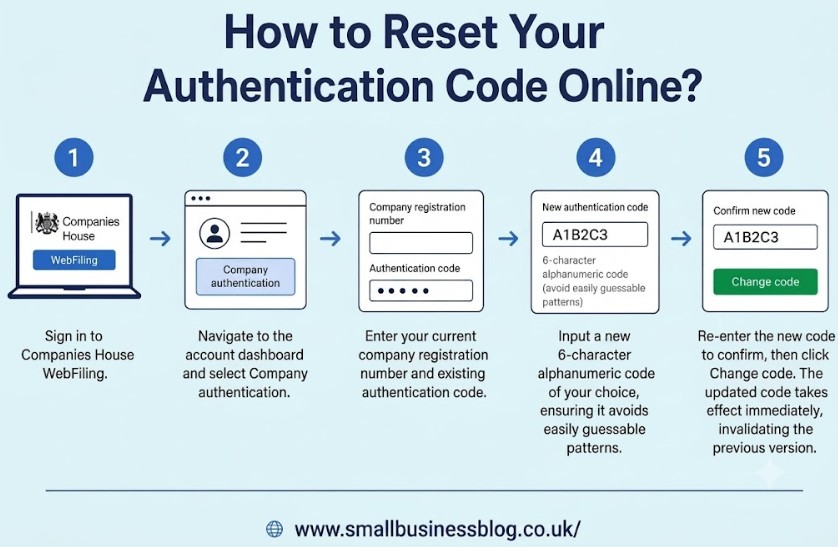
How to Reset Your Authentication Code Online?
-
Sign in to Companies House WebFiling.
-
Navigate to the account dashboard and select Company authentication.
-
Enter your current company registration number and existing authentication code.
-
Input a new 6-character alphanumeric code of your choice, ensuring it avoids easily guessable patterns.
-
Re-enter the new code to confirm, then click Change code. The updated code takes effect immediately, invalidating the previous version.
When Should You Change It?
A company authentication code should be changed immediately in any of the following scenarios:
-
A change in key internal personnel, such as the resignation of a director, company secretary, or internal administrator.
-
A change in external accountancy firms, bookkeepers, or corporate advisers who held access to filing systems.
-
Any suspected compromise or unauthorized attempt to access WebFiling credentials.
-
Following the discovery of fraudulent activity or unapproved filings on the public register.
The PROOF Scheme and Unauthorised Filing Security
To secure corporate records against identity theft, small businesses can enroll in the Protected Online Filing (PROOF) scheme operated by Companies House.
When enrolled in PROOF, Companies House refuses paper-based changes to key company details (such as director appointments or address changes). All modifications must be submitted electronically using the valid authentication code.
This eliminates the risk of rogue actors submitting fraudulent paper forms (such as paper AD01 forms) to alter corporate details without the directors’ knowledge.
Who needs a Companies House authentication code?
Every UK private limited company, public limited company, and limited liability partnership needs a Companies House authentication code to submit mandatory online filings.
Acting as your company’s official digital signature, this six-character credential allows directors, secretaries, and authorized accountants to file statutory accounts, update confirmation statements, and manage official corporate records on the WebFiling portal.
1. Entities That Require a Code
-
Private Limited Companies (Ltd) (limited by shares or guarantee)
-
Public Limited Companies (PLC)
-
Limited Liability Partnerships (LLP)
-
Dormant and Non-Trading Companies (must still file annual mandatory returns)
2. Primary Users
-
Company Directors and Officers: To submit statutory accounts and fulfill legal duties.
-
Company Secretaries: To maintain corporate governance and register updates.
-
Accountants and ACSPs: External agents handling tax submissions and filing compliance on your behalf.
3. Key Filings Requiring the Code
| Category | Relevant Forms | Purpose |
| Annual Filings | Form CS01, Form AA01 / AA02 | Submitting Confirmation Statements and annual/dormant accounts. |
| Director Changes | Form AP01, TM01, CH01 | Appointing, resigning, or editing director and secretary details. |
| Registered Address | Form AD01 | Changing the official Registered Office Address (ROA). |
| Control and Shares | Forms PSC01–PSC09, Form SH01 | Updating Persons with Significant Control (PSCs) or issuing shares. |
4. Company Code vs. Personal ECCTA Code
-
Company Authentication Code (6 characters): Issued to the company to authorize changes to corporate records.
-
Personal Verification Code (11 characters): A unique Companies House personal code issued to an individual director, officer, or authorized agent via GOV.UK One Login to confirm identity compliance under ECCTA regulations.
Company Authentication Code vs Personal Code: What Is the Difference?
Following the implementation of the Economic Crime and Corporate Transparency Act 2023 (ECCTA), Companies House introduced mandatory Companies House identity verification protocols.
This created a distinct separation between company-level authorization and individual identity checks.
| Feature | Company Authentication Code | Personal Code (Verification Code) |
| Primary Scope | Authorizes filings for a specific corporate entity | Verifies the legal identity of an individual person |
| Format | 6-character alphanumeric string (e.g.,3X7K9P) | 11-character unique code (e.g., PC-1234-5678-AB) |
| Issuing Authority | Companies House via physical postal dispatch | GOV.UK One Login after digital ID verification |
| Recipient | The registered office address of the company | The individual director, PSC, or authorized agent |
| Core Function | Acts as the corporate digital signature | Proves identity compliance under ECCTA 2023 rules |
Is It Safe to Share Your Authentication Code With an Accountant or Agent?
Sharing a company authentication code with a trusted accountant or professional filing agent is standard practice across UK business operations. However, because the code allows full administrative control over WebFiling, directors must implement strict governance practices:
-
Use Registered ACSPs: Ensure external advisers are registered as Authorised Corporate Service Providers under UK anti-money laundering regulations.
-
Audit Active Filers: Maintain a record of every external party holding the code.
-
Revoke Access Promptly: Update and reset the authentication code via WebFiling as soon as a contract with an external firm or contractor concludes.

Conclusion
The Companies House authentication code is an essential digital signature for UK company directors, authorizing all online statutory filings.
Because delivery takes up to 10 working days by post to the registered office address, business owners should verify their credentials well in advance of key filing deadlines.
If credentials are lost or compromised, request a replacement online via WebFiling, consider joining the PROOF scheme to block paper filing fraud, and reset the code whenever administrative access changes.
Disclaimer: This article provides general information only and does not constitute formal legal, financial, or corporate governance advice.
FAQs
How long does a Companies House authentication code take to arrive?
Official Companies House guidance specifies allowing up to 10 working days for delivery by post to your registered office address. Delivery cannot be expedited by phone or email.
Can Companies House email an authentication code?
No, Companies House never issues or resets authentication codes via email or telephone. The code is dispatched exclusively by post to the company’s official registered office address to prevent corporate fraud.
Can I file a Confirmation Statement without an authentication code?
No, You cannot submit a Confirmation Statement online through WebFiling without the code. However, you can file a physical paper Form CS01 by post to meet your statutory deadline.
What happens if my authentication code is entered incorrectly too many times?
Entering an incorrect code multiple times temporarily locks WebFiling access for that company. You must wait for the lock period to expire or request a replacement code online.




2 Comments