
How to Find Payroll Number: Locate Your ID on Payslips, P60s, or Online Portal Dashboards
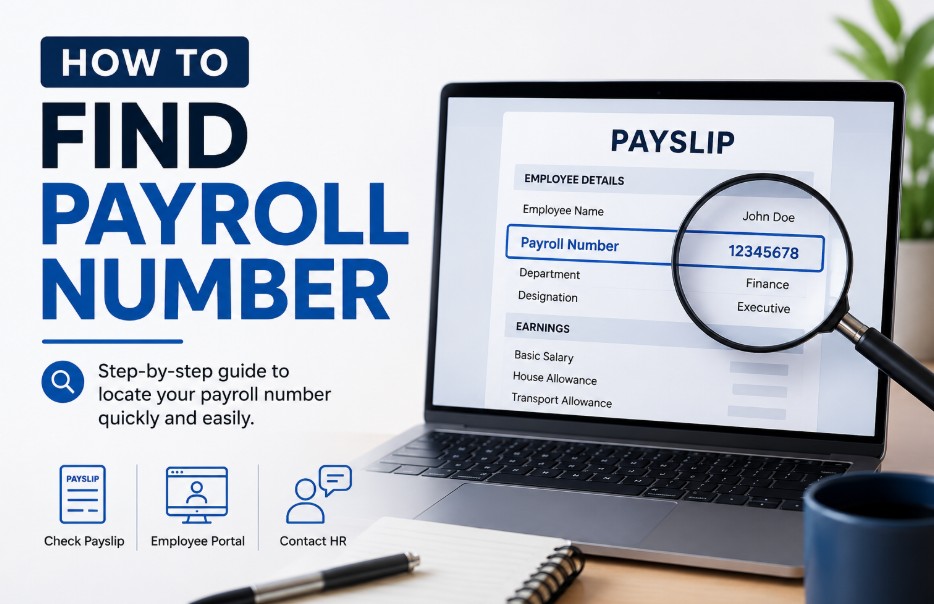
If you need to know how to find payroll number details, look at the top header of a recent printed or digital payslip.
If a payslip is unavailable, you can find this unique employee identifier on official tax documents, such as a P45 or P60, or by logging into your secure workplace employee self-service portal.
Key Takeaways
-
A UK payroll number is a unique alphanumeric code assigned by an employer to ensure accurate wage tracking and consistent HMRC Real Time Information reporting.
-
Individuals can easily locate their payroll ID at the top of a standard wage slip or within digital workplace portals like Sage, Workday, and Xero.
-
When a payslip is unavailable, workers can extract this identifier from an official P45 form, an end-of-year P60 certificate, or an employment contract.
-
A payroll number serves as an internal company tracker and remains completely distinct from both a National Insurance number and a statutory PAYE reference.
What Is a Payroll Number?
A payroll number is a unique alphanumeric identification code assigned to an individual worker by their employer’s finance or human resources department to track wages, tax distributions, and internal system data.
Also frequently called an employee number, payroll ID, or staff reference, this string provides a permanent record within your business infrastructure. There is no universal, nationwide format for these numbers in the UK.
One organization might use a simple sequential number like 104, while a larger corporation might use an alphanumeric code like EMP-2026-98X.
The overall length is entirely dependent on the specific payroll software configuration chosen by the employer, ranging from 2 or 3 digits up to 12 dynamic characters.

Why is a Payroll Number Important?
A payroll number is important because it ensures your wages, pension contributions, student loan repayments, and tax calculations are mapped directly to your exact record, preventing data duplication and safeguarding your government tax submissions.
For a business, these unique identifiers prevent data duplication and maintain absolute accuracy during monthly reporting cycles.
Crucially, when a business submits monthly payroll data to HM Revenue and Customs (HMRC), these codes keep internal business records perfectly aligned with government tax files, especially during routine HMRC wage raid payroll checks designed to verify accurate employee reporting.
For employees, having this number handy is essential when applying for personal financing (like mortgages) or when communicating with HMRC about tax queries.
Why does a business use these specific identifiers?
Payroll represents the administrative process of calculating and distributing financial compensation to workers, factoring in tax deductions, student loan repayments, and pension contributions.
Businesses rely on these individual identifiers to prevent data duplication and maintain absolute accuracy during monthly reporting cycles.
In practice, when a business submits payroll data to HM Revenue and Customs (HMRC), these numbers keep the internal records perfectly aligned with government tax files.
Where to Find a Payroll Number on a Payslip?
To find a payroll number on a payslip, look directly at the upper header area (typically the top-left or top-right quadrant). It is positioned alongside personal details like your name and is labeled as Employee No, Staff Ref, Payroll ID, or Clock Number.
Locating the payroll number on a standard UK wage slip
If you have a physical or digital payslip copy, follow these specific visual steps:
-
Obtain the paper document or download the digital PDF version of the most recent pay statement.
-
Direct attention to the upper section of the document, typically situated in the top-left or top-right quadrant.
-
Search for descriptive text labels such as Employee No, Payroll ID, Staff Reference, or Clock Number.
-
Document the corresponding digits or characters displayed immediately adjacent to or underneath that specific label.
How to Find Payroll Number Without a Payslip?
If you do not have a payslip, you can find your payroll number by examining your original employment contract, checking your annual P60 end-of-year tax certificate, or looking at a P45 form issued when leaving your previous company.
-
P45 Form: Look at the official P45 form issued by your previous employer when you left your last job. The final operational payroll code is explicitly listed under the employee details.
-
P60 Certificate: Check your annual P60 certificate (your end-of-year tax summary). The staff reference number is prominently displayed within the employee details panel.
-
Employment Contract: Review your primary employment contract or your official written statement of particulars. When HR prepares your contract, they typically generate your permanent database profile code and print it in the introductory section of your terms of service.
What to do if your employer doesn’t use payroll numbers?
If your employer does not use payroll numbers, verify that they track your tax data using your name and National Insurance details instead, and inform requesting third parties that no internal codes are issued.
-
Acknowledge company size: If you work for a micro-business or a brand-new startup, they may not use an internal numbering system at all.
-
Verify alternative tracking: When a firm employs only a few individuals, the owner often submits tax data using just the workers’ names and National Insurance details.
-
Inform third parties: If a bank, mortgage lender, or landlord asks for your payroll number, simply inform them that your employer does not issue internal staff codes.
How to Find Payroll Number Online?
You can find your payroll number online by logging into your employer’s secure cloud portal, navigating to the Pay or My Documents dashboard, and viewing a recent digital payslip header where the employee ID code sits next to your name.
-
Log in: Access your secure workplace ESS portal via a web browser or mobile application.
-
Navigate to your documents: Head to the portal section labeled Pay, My Documents, or Compensation.
-
Open a payslip: Open your most recent statement file to read your account reference data instantly from the document header.
Finding your payroll ID number on major software platforms
To find your payroll number on platforms like Sage, Workday, or Xero, log into your personal profile screen or click into the central Payslips app to read the reference string noted inside the header text.
-
Sage: Log into the Sage Employee Benefits or Sage Online Bureau portal, click on your personal profile icon, or download a historical PDF statement to see the ID listed directly beneath the company name block.
-
Workday: Access your central user dashboard, click on the Pay application shortcut, select Payslips from the available menu options, and view your worker profile segment where your global employee ID is displayed.
-
Xero: Open the Xero Me employee interface, navigate directly to the profile tab, or inspect any historical earnings statement where your unique tracking reference code sits directly within the header info.
If your employer manages staff finances through other major software, you might wonder, does QuickBooks similarly do payroll? Yes, and you can easily locate your worker ID on their digital statements as well.
How to find payroll number online via your HMRC Personal Tax Account?
-
Log in to HMRC: Go to the official UK Government Personal Tax Account platform.
-
Authenticate: Log in securely using your Government Gateway credentials.
-
View your employment history: Navigate to your historical employment summaries to review past tax years and Real Time Information (RTI) submissions.
-
Locate the ID: Inspect the specific payroll IDs transmitted to HMRC by your employer alongside your declared earnings.
How to find payroll number on a teacher payslip or NHS payslip?
On an NHS payslip, the code is found under the Assignment Number or Employee Number label via the ESR portal. On a teacher payslip, it is displayed as a ‘Staff Reference’ alongside your DfE registration number.
Public sector payroll formats feature distinct structural layouts due to the immense scale of their workforce operations.
-
NHS Payslip: Log into the Electronic Staff Record (ESR) portal. Your payroll ID is usually designated as your Assignment Number or Employee Number located near the top margin of the slip.
-
Teacher Payslip: Inspect the top header of the slip. The school-specific staff reference code is generally displayed alongside your central Department for Education (DfE) registration teacher number.
Is a Payroll Number and PAYE Reference Number the Same?
No, a payroll number identifies an individual employee within a business, whereas an Employer PAYE Reference Number is a unique code assigned by HMRC to identify the entire company’s tax scheme.
To help make the distinctions clear, here is how the three main employment identifiers compare:
| Feature | Payroll Number | Employer PAYE Reference | National Insurance Number |
| Primary Issuer | Individual Employer | HM Revenue & Customs (HMRC) | Department for Work and Pensions |
| Core Purpose | Tracking internal staff data & wages | Identifying the firm’s overall tax scheme | Tracking a person’s lifetime tax & benefits |
| Typical Format | Variable (e.g., 104 or EMP-98X) | 3 digits followed by letters/numbers (e.g., 123/AB456) | 2 letters, 6 numbers, 1 letter (e.g., QQ123456A) |
| Portability | Changes with every new job | Stays with the specific employer | Stays with the individual for life |
How Does a Payroll Number Protect Employee Data?
A payroll number protects data by acting as an abstract, anonymous substitute identifier for internal spreadsheets, banks, and audits, dramatically reducing how often sensitive National Insurance numbers are exposed.
-
Anonymisation of sensitive data: In day-to-day administrative tasks, spreadsheets, and internal financial audits, employers can use payroll numbers instead of full names. This prevents casual observers or unauthorized staff from matching sensitive salary figures directly to individual faces.
-
Minimised use of National Insurance (NI) numbers: Your NI number is a highly sensitive government identifier prone to identity theft if leaked. Using an internally generated payroll ID for standard communications dramatically reduces how often your NI number needs to be shared or displayed.
-
Secure system integration: When internal HR databases transfer information to banking systems or pension providers, they use the payroll ID as the primary key. If a data packet is intercepted, it is highly secure because it contains abstract system codes rather than easily readable personal details.
What Are Common Issues in Payroll Numbers?
Common issues include system duplicate IDs between branches, onboarding generation lags for new hires, software migration mismatches, and profile validation loops when rehiring former staff members.
While the tracking frameworks are highly automated, errors and administrative bugs can still crop up during standard business operations.
-
Duplicate IDs: If a system is configured incorrectly, two employees (often in different departments or branches) can accidentally be assigned the same ID number, causing major data overlap.
-
Onboarding delays: When a new employee starts, there can be a lag between their start date and when the system generates their active payroll profile, temporarily leaving them without an ID.
-
Software migration errors: When a company switches software (e.g., migrating from Sage to Workday), legacy employee IDs may fail to map correctly, causing temporary profile lockouts.
-
Orphaned profiles: If an employee leaves the company and is rehired at a later date, the system may struggle to decide whether to reactivate their old payroll number or issue a brand-new one.
How Does It Impact an Employee’s Salary?
A missing or incorrect payroll number can delay bank transfers through the BACS network, prompt HMRC to place you on a costly emergency tax code, or corrupt your annual P60 accumulation statement.
-
Payment delays: If your payroll number is missing or incorrect in the BACS (Bankers’ Automated Clearing System) file, the bank may reject your salary transfer, resulting in a delayed payday.
-
Incorrect tax calculations (Emergency Tax): HMRC tracks your personal allowance and income tax bracket using a combination of your NI number and your payroll ID. If your employer submits your earnings under a mismatched payroll ID, HMRC’s automated systems may assume you have an undeclared second job and put you on an expensive emergency tax code.
-
Pension and deduction discrepancies: Automated contributions to workplace pensions, student loan repayments, and child maintenance services rely entirely on your payroll number. An issue here can lead to missed contributions or incorrect deduction amounts.
-
Inaccurate Year-End P60 records: Your annual P60 summary is built using the cumulative data mapped to your payroll ID. If you have had duplicate or incorrect IDs during the tax year, your final P60 may show inaccurate total earnings, which can complicate tax returns or mortgage applications.
Summary
Locating a payroll number in the UK is a straightforward task when utilizing standard workplace documents like payslips, P45 forms, P60 certificates, or digital employee self-service platforms.
For employees, keeping track of this number is essential when communicating with HMRC or applying for personal financing.
On the employer side, small business owners must ensure these numbers are consistently generated and cleanly mapped within platforms like Sage or Xero for smooth Real Time Information (RTI) submissions.
Managers should keep their teams well-informed about how to access these records digitally to reduce internal administrative burdens.
FAQ
How do I find my payroll ID number if I am a new hire?
A newly hired individual can locate this specific number by checking their initial onboarding documentation, inspecting their first official monthly wage slip, or sending a direct inquiry to the company human resources department.
Where would I find my payroll ID number if my company changed HR systems?
Following a systemic enterprise software migration, the updated tracking identifier can be located by logging into the newly deployed employee self-service platform or by reviewing the first wage slip generated by the new platform.
Does a payroll number change when you change jobs or switch roles internally?
A payroll number changes completely whenever an individual transitions to a new employer. However, if a worker merely switches departments or earns a promotion within the same company, the internal number typically remains identical.
Can you find out the employees of a company using a payroll sequence?
No, an external party cannot determine or map the entire workforce layout using these codes, as payroll sequences are protected by secure corporate databases and governed by strict UK data privacy regulations.
Is my payroll number the same as my National Insurance number?
No, these two identifiers are completely different. A National Insurance number is a permanent government identifier for tax tracking, whereas a payroll number is a temporary code assigned by an individual employer.
How do I find my employer’s PAYE reference number?
An individual can easily find their employer’s specific PAYE reference number by looking at the top section of their P60 certificate or by checking their formal P45 document under the employer details section.
What should I do if my payroll number is missing from my digital dashboard?
If the identification field appears blank in a digital portal dashboard, the employee should immediately contact their internal payroll administrator to verify that their profile configuration is complete.
Disclaimer: This guide is for informational purposes only; always consult your employer’s payroll administrator or HMRC for official tax and employment verification.