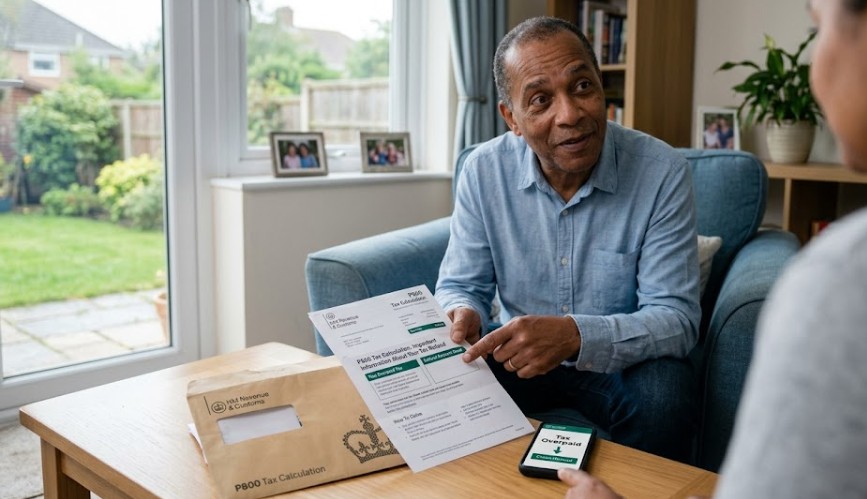
Do HMRC Automatically Refund Overpaid Tax? The 2026 UK Guide
Last Updated on
Do HMRC automatically refund overpaid tax? Yes, HMRC identifies overpayments through the PAYE P800 process between June and November, but you must proactively claim the funds via the HMRC App or Personal Tax Account to trigger a BACS transfer.
Refunds for Self-Assessment and pension lump sums are not automatic and require explicit digital applications.
What is a Tax Refund?
A tax refund, or tax rebate, is the legal reimbursement of excess Income Tax paid to HMRC. In the UK, while the PAYE system automates many deductions, fluctuations in your £12,570 Personal Allowance or emergency tax codes often result in an overpayment that must be reconciled.
In the UK, the tax system typically calculates deductions automatically through PAYE (Pay As You Earn). However, because these calculations are based on your projected annual earnings, changes in your circumstances can lead to overpayment.
Common Reasons You May Be Owed a Refund
HMRC issues a refund when your total tax paid exceeds your actual legal liability. It is essentially the tax office returning interest-free loans you inadvertently gave the government.
-
Incorrect Tax Code: You were assigned an Emergency Tax Code or a code that did not account for your full Personal Allowance (£12,570 for the 2026/27 tax year).
-
Employment Gaps: If you had a period of time during the year where you weren’t working (or were suspended without pay), you may not have utilised your full tax-free allowance.
-
Income Fluctuations: Moving from a high-salary position to a lower-paid role, or shifting from full pay to Statutory Sick Pay (SSP), often results in overtaxation in the earlier months of the year.
-
Work-Related Expenses: You paid out-of-pocket for professional fees, uniforms, or travel to temporary work sites that were not reimbursed by your employer.
-
Redundancy: Certain portions of a redundancy or settlement agreement (typically up to £30,000) are tax-free. If tax was deducted from this amount by mistake, a refund is required.
Do HMRC automatically refund overpaid tax for PAYE employees?
Yes, HMRC automatically calculates overpaid tax for PAYE employees, but they do not automatically send the money to your bank.
After the tax year ends on 5 April, HMRC reconciles your records and issues a P800 notice. You must then log in to the HMRC app or website to confirm your bank details and claim the repayment manually.
In the UK, the PAYE (Pay As You Earn) system typically reviews the records of millions of taxpayers annually. If you have been on an incorrect tax code or changed jobs, HMRC’s systems will spot the discrepancy between June and November.
However, the shift to digital-first processing means the days of receiving a surprise cheque in the post without asking are largely over.
How does the refund process work?
The modern UK refund process is a digital-first system designed to prevent fraud. Once HMRC confirms you have overpaid, they notify you via a P800 letter or an app alert.
From there, you must opt in to the payment by providing or confirming your BACS bank details within your digital tax account.
If you do not interact with the digital notification within 45 days, HMRC eventually defaults to mailing a physical cheque to your home address.
How long does it take for HMRC to pay a tax refund?
Taxpayers can typically expect their records to be reconciled between June and November each year. Once you receive your P800 and make a digital claim, the speed of payment depends on the method chosen:
If you use the HMRC App to claim your refund immediately after receiving your P800 calculation, the money usually arrives in your bank account within three to five working days.
However, those who wait for a manual cheque may face a delay of six weeks or more due to postal and security processing.
The shift from cheques to digital-first payments
As of 2026, HMRC has shifted its focus almost entirely away from physical payable orders (cheques) in favour of digital-first processing.
While their internal systems spot overpayments without your intervention, the standard procedure now prioritises direct bank transfers.
If your bank details aren’t already on file, you’ll typically receive a notification to log in and claim the balance rather than receiving a surprise cheque in the post.
| Refund Method | Typical Timeline | Action Required |
| HMRC App / Online Account | 5 to 10 working days | Log in and click ‘Claim your refund’ |
| Automatic BACS Transfer | 3 to 5 working days | None (if details are already held) |
| Postal Cheque | 5 to 6 weeks | None (triggered if the digital claim is ignored) |
How to check the status of your refund?
You can monitor your refund status in real-time by logging into the HMRC App or the official Government Gateway portal. Under the Tax Years or Messages section, look for a Paid or Pending status next to your latest P800 calculation.
The Check Progress tool is the most reliable way to see if your claim has been authorised or if HMRC requires further verification of your P60 or P45 details.
How to avoid overpaying tax in the future?
The best way to stop overpaying is to ensure your tax code is always accurate on your payslip.
You should proactively update HMRC via your online account whenever you change jobs, lose a taxable benefit like a company car, or if your income fluctuates significantly.
-
Audit Payslips: Regularly verify your tax code (e.g., 1257L) matches your current role.
-
Report Changes: Update HMRC immediately if you change jobs, lose a company car, or your income fluctuates.
-
Estimated Income: Use the Check your Income Tax service on GOV.UK to ensure your allowance is spread accurately across your paycheques.
Will tax be automatically refunded for everyone?
The automatic nature of a refund depends entirely on your employment status and how you interact with the UK tax system.
For individuals whose only income is through an employer (PAYE), the reconciliation happens in the background.
However, if you have complex income streams, such as rental property or dividends, you may find yourself asking: Do HMRC automatically refund overpaid tax for non-standard income?
This is a common concern for savers, particularly regarding tax on savings interest for those exceeding their annual personal allowance. The answer is usually no; the responsibility to identify and claim an overpayment shifts back to you in these cases.
Why do some refunds remain pending?
In practice, a refund might show as calculated in your Personal Tax Account but remain pending for weeks.
This usually happens if HMRC requires additional verification or if there is a discrepancy between your P60 and the figures provided by your employer.
For example, if you finished a fixed-term contract in December 2025, HMRC’s systems might not fully reconcile your total earnings against your tax code until the following June.
In this situation, the automatic refund won’t trigger immediately, and the status may sit as pending until the annual PAYE wrap-up is complete.
Do HMRC automatically refund overpaid tax on pension lump sums?
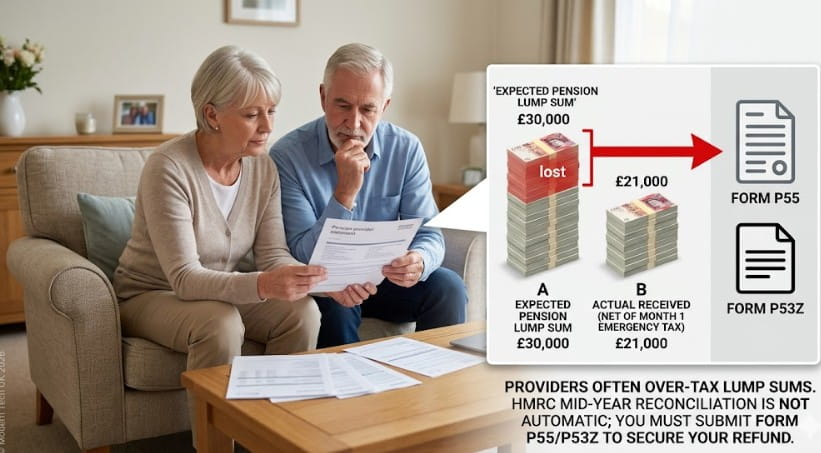
No, HMRC rarely issues automatic mid-year refunds for pension lump sums. Because providers often apply an emergency Month 1 tax code, you will likely overpay significantly.
To get this money back before the end of the tax year, you must proactively submit form P55, P53Z, or P50Z to HMRC.
How to Claim a Pension Tax Refund?
To avoid waiting until the end of the tax year, you must proactively notify HMRC of the overpayment. Follow these steps to expedite the process:
-
Obtain your P45 from your pension provider showing the tax deducted.
-
Log in to your Government Gateway account or the HMRC app.
-
Determine which form applies to your situation (P55, P53Z, or P50Z).
-
Complete the form with details of any other income received in the current tax year.
-
Submit the digital form via the HMRC portal.
-
Monitor the Check Progress section of your Personal Tax Account.
-
Receive the funds via BACS transfer within 30 days of a successful claim.
Do HMRC automatically refund overpaid tax self assessment?
No, HMRC does not spontaneously reconcile Self-Assessment accounts. When you file your tax return, the software calculates your liability, but any credit will sit on your account to offset future bills.
You must specifically enter your bank details in the repayment section of the return to receive the cash.
Managing the refund via your return
When you file your 2025/26 tax return, the software calculates your total liability. If your Payments on account or tax deducted at source exceed what you owe, the final page of the return will show that a repayment is due.
You must ensure you enter your bank details in the repayment section of the return; otherwise, the credit may simply sit on your HMRC account to be offset against future tax bills.
How long does it take HMRC to refund an overpayment?
As of 2026, the speed of a refund is dictated by the channel used for the claim. Digital claims made via the HMRC app are processed with the highest priority, but you should check the typical refund clearance times to see when the money will actually hit your bank account.
Generally, digital claims made via the HMRC app are processed with the highest priority. If you receive a P800 letter stating you can claim online, the money usually hits your bank account within five working days of the request being submitted.
Understanding the assessment window
The time elapsed after a tax assessment is also a factor. Once HMRC issues a P800 or a Self-Assessment calculation, the assessment is complete.
If you do not claim the refund online within 21 to 45 days, HMRC will eventually trigger a manual cheque. This manual process is significantly slower due to postal times and the administrative overhead of physical payment security.
How do I get a tax refund in the UK manually?
If you believe you have overpaid but haven’t received a P800, you may need to trigger the process yourself. This is common for those claiming professional expenses, uniform washing allowances, or working-from-home tax relief.
This is common for those claiming professional expenses or seeking to claim mileage back if their employer pays below the approved government rates.
Using official digital portals
The most secure way to track this is through the official P800 refund portal on GOV.UK or by using the HMRC App.
By reviewing your Tax Years history, you can see at a glance if a specific period is underpaid, overpaid, or balanced.
| Feature | HMRC App | Personal Tax Account (Web) |
| Speed | Fastest (Direct BACS) | Fast (Direct BACS) |
| Security | Biometric Login | Government Gateway / 2FA |
| 2026 Updates | Real-time Pending updates | Detailed breakdown of P800 |
Summary and Next Steps
To ensure your 2026 refund is processed without delay, it is best to prioritise digital channels over postal ones.
While the tax office identifies most overpayments without you needing to call them, the quickest way to get the money into your bank account is by using the HMRC App to claim your balance as soon as the P800 calculation is issued.
Always verify your tax code on your payslip to prevent overpayments before they happen. While managing your tax, ensure you aren’t missing out on other government support, such as the cost-of-living payment, if you meet the eligibility criteria for specific benefits.
If you receive a P800 and are unsure whether HMRC automatically refund overpaid tax to your bank, log in to the official GOV.UK portal immediately to claim your funds via BACS manually.
FAQ
Has HMRC stopped automatic refunds?
No, but they have prioritised notifying of refunds. While they still calculate overpayments automatically, they now prefer you to opt in to the payment via their digital app to prevent fraud and ensure bank details are current.
How do I know if I have a tax refund in the UK?
The most reliable indicators are receiving a P800 letter in the post or checking the Messages and Tax Year sections of the HMRC app, which will display any overpayments for the last four years.
What is the 2026 deadline for claiming back tax?
You can generally claim for the current tax year and the four previous years. As of 2026, the oldest year you can typically claim for is the 2021/22 tax year, provided you submit before 5 April.
Will HMRC text me about an automatic refund?
HMRC never sends notifications of a specific tax refund amount via SMS or WhatsApp. Any text containing a link to “claim your money” is almost certainly a scam. Official notifications occur via the app or post.
How long after an assessment do you get a refund?
If the assessment is via PAYE (P800), online claims take about 5 days. For Self-Assessment, it typically takes 2 to 4 weeks after filing the return, assuming no security checks are triggered.
Can I get a refund if I overpaid taxes through a side hustle?
If you pay tax via Self-Assessment for your side hustle, any overpayment (perhaps due to high expenses) will be calculated when you file your return and can be claimed back to your bank account then.
Do HMRC automatically refund overpaid tax on a pension?
Generally, no. Pension tax is often complex. While they might eventually reconcile it at year-end, most people need to submit a P55 or similar form to get their money back within 30 days.
What happens if I ignore the P800 letter?
If you do not claim your refund online after receiving the letter, HMRC will eventually send a cheque to the address they have on file. This usually happens 45 days after the letter was issued.