How to Get a Share Code for Right to Work? A 2026 Step-by-Step Guide
Last Updated on
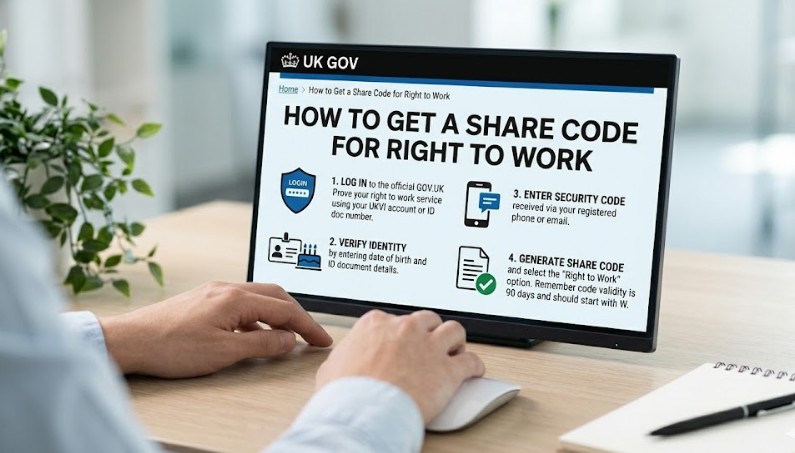
To get a share code for right to work, sign in to your UKVI account at gov.uk/prove-right-to-work, verify your identity, and select Prove your right to work to an employer. The service generates a free, 9-character code starting with W, valid for 90 days, which you give to your employer along with your date of birth.
Key takeaways
- Right to work share codes are free, start with the letter W, and stay valid for 90 days from generation.
- Physical Biometric Residence Permits expired on 31 December 2024 and no longer count as right to work proof alone.
- Employers face fines of £45,000 per illegal worker for a first breach and £60,000 for a repeat breach.
- Workers without a share code can rely on the Employer Checking Service if their application is still pending.
What is a Share Code?
A UK Right to Work share code is a temporary, single-use nine-character alphanumeric security key generated online by an individual via the official GOV.UK portal. It allows prospective employers to securely access the applicant’s live immigration record to verify their legal right to work.
Understanding how to get a share code for the right to work is essential for any non-British or non-Irish citizen starting a new job in the UK.
By logging into the official GOV.UK portal, with your UKVI account or identity document, you can generate this string that allows employers to verify your immigration status instantly and securely through the Home Office database.
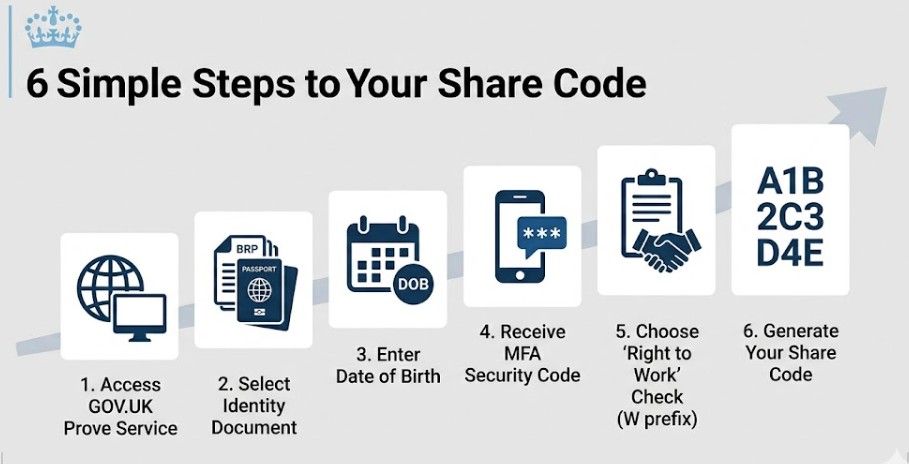
How to get a share code for right to work? A 6-step breakdown
To build or generate your share code, visit the GOV.UK portal, enter your identity document details (Passport or BRP) and date of birth, and complete the Multi-Factor Authentication. Once logged in, select Right to Work as the purpose. The system will then generate your 9-character code starting with the letter ‘W’.
-
Visit the Portal: Navigate to the official GOV.UK: Prove your right to work page.
-
Choose Your Document: Select the identity document linked to your UKVI account (usually your biometric passport).
-
Enter Personal Details: Input your date of birth and your document number exactly as they appear on your records.
-
Verify via MFA: Enter the security code sent to your registered mobile number or email.
-
Select Purpose: Choose Right to Work from the options provided (avoid Right to Rent).
-
Generate & Save: Click Generate Share Code and download the PDF for your records.
Common Mistakes to Avoid with Share Codes
The most frequent error is providing a Right to Rent code (starting with R) instead of a Right to Work code (starting with W). Other common slip-ups include using an unlinked passport, entering incorrect dates of birth, or failing to download the PDF profile.
Missing that download can completely invalidate an employer’s statutory excuse.
When a worker generates a code, they are essentially unlocking a specific view of their eVisa. This ensures that sensitive personal data is kept private while the employer only sees the information necessary to satisfy the law.
It’s worth double-checking your code prefix before hitting send; many people accidentally generate a ‘Right to Rent’ code, which an employer cannot use. To verify employment, your code must begin with the letter W.
| Feature | Details |
| Code Length | 9 Characters (e.g., A12-345-67G) |
| Validity Period | 90 Days from generation |
| Primary Prefix | Starts with W for Right to Work |
Who is Eligible and Needs a Right to Work Share Code?
Most non-British and non-Irish citizens, including those with eVisas, settled or pre-settled status under the EU Settlement Scheme, and former Biometric Residence Permit holders, need a share code.
Since BRPs expired at the end of 2024, digital verification through a UKVI account is mandatory for these groups to prove their status to UK employers. As of 2026, most new successful applicants receive digital-only status from the outset, with no physical card issued at all.
Finding a role often opens up diverse career pathways, and many individuals transition into Jobs That Pay £50K a Year Without a Degree across various growing sectors.
Securing a right to work share code is now a mandatory step for most non-British and non-Irish citizens starting a new role. Physical Biometric Residence Permits expired on 31 December 2024 and were replaced by the digital eVisa.
Since then, generating a share code through your UKVI account has been the only reliable way for a business to establish its statutory excuse against a civil penalty.
An expired BRP still has limited uses for up to 18 months after its printed expiry date, mainly for setting up a UKVI account or linking to an eVisa, but it can no longer be used on its own as proof of right to work.
What Documents are Needed for Share Code UK?
To access the share code portal in 2026, you specifically need the identity document linked to your digital UKVI account (usually a biometric passport), your UKVI account login credentials, and access to the mobile device or email address registered for Multi-Factor Authentication (MFA) to receive security codes.
In 2026, the UK border is digital by default. For small business owners and employees alike, understanding the mechanics of the Home Office portal is essential for compliance.
When a worker generates a code, they are essentially unlocking a specific view of their eVisa.
-
A valid Passport: This must be the one linked to your UKVI account.
-
UKVI Account Credentials: Your sign-in email address and password.
-
Access to your Device: To receive MFA codes.

Why is sharing code important for small businesses?
For UK small businesses, processing a digital share code is the mandatory legal method to establish a statutory excuse against civil penalties. Failing to perform this check correctly exposes the business to fines of up to £45,000 per illegal worker for a first breach, rising to £60,000 per illegal worker for a repeat breach within three years.
These are starting points before any reductions. Employers who pay in full within 21 days of a first penalty may qualify for a 30% Fast Payment reduction, and the Home Office can also reduce the amount where the employer has cooperated fully or already has effective right to work checks in place.
| Breach type | Maximum starting penalty | In force since |
|---|---|---|
| First breach (within 3 years) | £45,000 per illegal worker | 13 February 2024 |
| Repeat breach (within 3 years) | £60,000 per illegal worker | 13 February 2024 |
| First breach, paid within 21 days | 30% reduction on the starting figure | 13 February 2024 |
This compliance is equally important for those in the service industry. Whether you are calculating a Self-Employed Gardener Hourly Rate UK or setting a Self-Employed Cleaner Hourly Rate UK, ensure that any staff you hire have been digitally verified to protect your business assets.
-
Real-time accuracy: Unlike physical cards, the digital portal reflects current visa revocations or extensions.
-
Fraud Prevention: Digital codes are significantly harder to forge than physical permits.
-
Record Keeping: Employers must download and save the Right to Work Profile PDF generated by the code to prove the check was conducted.
Under the updated 2026 Home Office framework, checking a physical BRP card or relying on an expired passport no longer grants a small business a statutory excuse.
All new compliance checks for non-British/non-Irish staff must be completed digitally via a valid ‘W’ prefix share code to avoid prosecution.
How to use a share code for right to work properly?
To use a share code properly, the employee must provide the 9-character code and their date of birth to the employer. The employer must then enter these into the View a job applicant’s right to work service and conduct a visual identity check (in-person or via video) to remain compliant.
Once you have the code, you must provide it to your employer along with your date of birth. The employer then enters these details into a separate View a job applicant’s right to work portal.
Identity Verification Comparison
Many people mistakenly assume that conducting a digital check overrides the requirement for an in-person meeting. It absolutely does not.

| Action | Digital Share Code Check | Physical Identity Check |
| Data Source | Home Office Live Database | Manual inspection of the document |
| Employee Presence | Required (In-person or Video Link) | Required (In-person) |
| Outcome | PDF Profile with Photo | Photocopy of Passport/BRP |
| Validity | 2026 Standard (Mandatory) | Legacy only (British/Irish) |
Imagine a local shop hiring a new team member; even with a valid digital code, the manager must still confirm that the person in front of them (or on a live video link) matches the photograph on the Home Office screen. Missing this visual step can invalidate the legal protection for the business.
Can I work in the UK without a share code?
Non-British and non-Irish citizens cannot legally start employment in the UK without a valid share code. Because physical Biometric Residence Permits (BRPs) are completely phased out in 2026, the digital share code service linked to an eVisa is the only legally accepted proof of status.
While some individuals with outstanding applications may use the Employer Checking Service (ECS), the vast majority of workers are now expected to use the eVisa system.
If you are still looking for a role, consult our updated List of Companies That Can Sponsor Visa to find employers equipped to handle digital sponsorship and share code verifications.
-
British and Irish Citizens: Use physical passports or Irish passport cards; no share code is required.
-
Outstanding Applications: If your visa is being processed, your employer must request a Positive Verification Notice (PVN) from the Home Office.
-
Legacy Paper Documents: These are no longer accepted for new employees in 2026; you must convert your status to an eVisa first.
How to check a share code for right to work as an employer?
Privacy rules are strict: employees must generate their own code. An employer asking for your login details is not only unprofessional but is likely breaching GDPR and Home Office security protocols. Instead, use the dedicated View a job applicant’s right to work details service.
-
Input: Enter the candidate’s share code and their date of birth.
-
Review: Check the Work Conditions, some visas limit the number of hours (e.g., Student visas are often 20 hours per week).
-
Download: Save the confirmation as a PDF or print it.
-
Expiry: Note any expiry dates; a follow-up check must be scheduled before the current visa expires.
How Does Right to Work Verification Impact SMEs, Startups, and Diverse Business Operations Across Sectors?
A Right to Work share code check is the mandatory online process UK businesses use to verify a non-British or non-Irish candidate’s legal employment status via the Home Office database. Executing this check correctly establishes a statutory excuse, shielding employers from civil penalties of up to £60,000 per illegal worker.
-
Operational Workflows: Digital eVisas eliminate physical document management, enabling instant onboarding once managers pair the 9-character ‘W’ prefix code check with a mandatory visual identity match.
-
Cost & Financial Risk: Non-compliance carries severe fines—starting at £45,000 per illegal worker for a first breach (£31,500 with a 21-day Fast Payment reduction) and rising to £60,000 for repeat offenses.
-
Productivity & Hiring Speed: Instant database checks reveal precise work conditions and hour limits, accelerating talent acquisition in fast-moving and high-turnover sectors.
-
Compliance & Audit Protection: Missing the step to download and store the Home Office PDF profile—or accepting a ‘Right to Rent’ code (starting with ‘R’)—invalidates your legal protection.
-
Market Competitiveness: Agile, GDPR-compliant digital verification helps businesses securely onboard international talent while safeguarding operational licenses and corporate reputation.
Conclusion
Getting a right to work share code is a short online process through your UKVI account: sign in, choose prove your right to work to an employer, and generate a free 9-character code starting with W, valid for 90 days.
Give it to your employer with your date of birth, and make sure they complete both the online check and a visual identity check; a code alone isn’t enough.
If your status is still pending, the Employer Checking Service and a Positive Verification Notice are the correct fallback, not an expired BRP.
Disclaimer: This article is for informational purposes only and does not constitute official legal or immigration advice; please refer to GOV.UK for the latest statutory guidelines.
FAQ
How can I prove my right to work in the UK?
Most non-British and non-Irish citizens prove their right to work with a share code from their UKVI account. British and Irish citizens use a passport instead, and some individuals rely on the Employer Checking Service if a share code isn’t available.
Is UKVI the same as share code?
No. UKVI is the Home Office directorate and the online account system that holds your immigration status. A share code is a temporary key generated from within that UKVI account to let an employer view your status.
Where can I find my share code?
You generate a share code yourself at gov.uk/prove-right-to-work by signing into your UKVI account; it isn’t sent to you automatically or stored anywhere for you to retrieve later.
How to check if a person is allowed to work in the UK?
Employers enter the applicant’s share code and date of birth into the View a job applicant’s right to work details service, then complete a visual identity check against the photo shown.
What happens if I can’t generate a share code?
If your application is still pending, ask your employer to use the Employer Checking Service. The Home Office will confirm your status directly and issue a Positive Verification Notice if you’re eligible to work.
Can an employer refuse to accept a share code?
No. If you have a valid, correctly generated share code, an employer cannot insist on a physical document instead, provided the code and visual identity check are completed correctly.