
Postponed VAT Statement UK: How Small Business Owners Can Get and Report PIVA
A Postponed VAT Statement is an official monthly record issued by HMRC detailing import VAT liabilities under Postponed Import VAT Accounting (PIVA).
For the 2025/26 tax year, it enables UK VAT-registered businesses to declare and reclaim import tax on the same MTD VAT return, avoiding upfront payment at the border.
Key Takeaways
-
Postponed import VAT accounting allows UK businesses to declare and recover import tax simultaneously on VAT returns without paying charges at the border.
-
Monthly statements are published on the Customs Declaration Service portal by the tenth working day and remain online for exactly six months.
-
Small business owners must report exact figures across Boxes 1, 4, and 7 of their MTD VAT returns.
-
Active registration requires a valid United Kingdom registration number linked with an operational government gateway account for secure portal access.
How to Get a Postponed VAT Statement as a Small Business Owner?
HMRC does not post paper copies of Postponed VAT Statements (PVS). Business directors or bookkeepers must log into the Customs Declaration Service dashboard monthly to download these records.
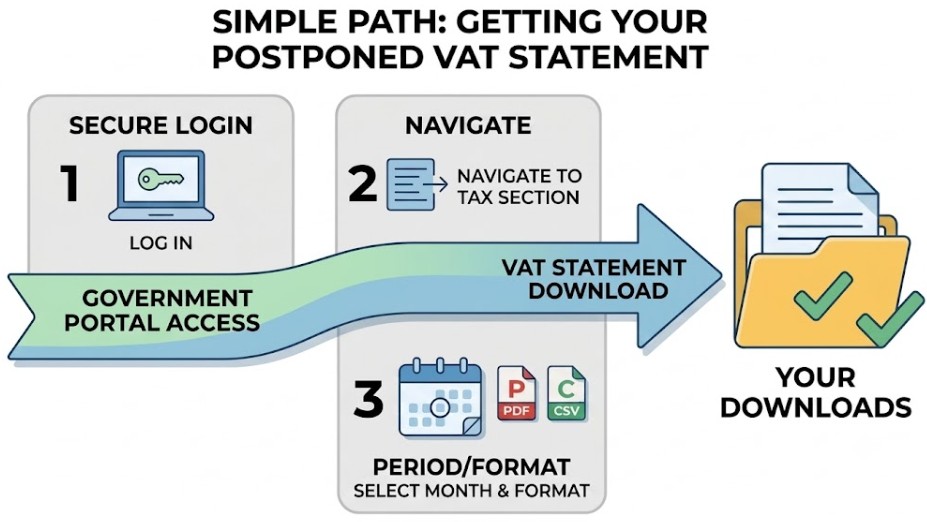
Step-by-Step Guide to Get a Postponed VAT Statement
-
Access the Government Gateway: Go to the official GOV.UK portal and log in using your secure business credentials.
-
Navigate to the Customs Declaration Service (CDS): Select the option to access your CDS financial dashboard, where your import tax profiles and statements are managed.
-
Locate the Financial Records Tab: Find the dedicated section labeled Postponed import VAT statements.
-
Select the Correct Reporting Period: Filter the list by month and year to match your exact accounting or VAT return window. Keep in mind that statements are typically published by the 10th working day of the month following import.
-
Download and Export: Choose the required document and download it in your preferred format, PDF (ideal for visual auditing and management review) or CSV (perfect for importing directly into accounting software like Xero or Sage).
-
Save Local Backups: Save the downloaded file into a secure internal folder (e.g., Accounting > Year > VAT Period > PVS) to meet HMRC digital record-keeping rules.
Set a recurring calendar reminder for the 12th working day of every month. This ensures you download your statements well after they are published, avoiding the strict six-month rolling deletion window on the CDS portal and preventing frantic calls to HMRC customer support later.
What are the essential requirements before you log in?
-
Government Gateway Account: Ensure you have the login credentials (and multi-factor authentication device) linked to your organization’s Customs Declaration Service (CDS) financial profile.
- CDS Service Subscription: Ensure your business has explicitly added the Customs Declaration Service to its Government Gateway account. Holding a GB EORI number alone does not automatically grant access to the CDS financial dashboard until you complete this online enrolment step.
-
Economic Operators Registration and Identification (EORI) Number: Your EORI number must start with GB and be correctly tied to your active UK VAT registration.
-
User Permissions: If you use an agent or accountant to handle customs, ensure your Government Gateway user permissions grant you financial viewing rights.
Do I Need to Register for Postponed VAT Accounting?
Fortunately, there is no separate registration or formal sign-off needed from HMRC. Provided your enterprise is VAT-registered in the UK, you can start using the scheme on your very next import shipment.
If you are unsure of your current tax status or need to verify a supplier’s setup, you can learn to find a company’s VAT registration number before submitting customs declarations.
To use Postponed Import VAT Accounting, your business must meet the following core requirements:
-
Active Tax Status: The enterprise must hold a valid United Kingdom registration number.
-
Commercial Purpose: Imported commodities must support direct business operations rather than private use.
-
Customs Alignment: Declarations must correctly route through modern digital processing systems.
Make sure to give your logistics partners explicit written instructions to use PIVA well before your goods hit the port. If you leave this step out, freight agents usually fall back on traditional border charges, instantly tying up cash you expected to retain.
If a freight forwarder mistakenly pays import VAT at the border instead of applying PIVA, you cannot use a Postponed VAT Statement to account for that shipment.
Instead, you must obtain a C79 certificate or clearance invoice from the agent to reclaim the border VAT on your return, and update your standing instructions with the carrier for future shipments.
When Is the Postponed VAT Statement Available?
Timing is everything when it comes to matching your import records with your periodic tax filings. Knowing exactly when to look for your documents prevents unnecessary stress and missed deadlines.
-
Publication Schedule: HMRC publishes monthly Postponed VAT Statements (PVS) on the Customs Declaration Service (CDS) portal by the 10th working day of the month following the month your goods cleared customs.
-
The Import Date Rule: Your statement is generated based on the date the goods were released into free circulation (the customs clearance date), not the invoice date or the shipping date.
-
Planning Your Workflow: Because statements usually arrive well before standard quarterly VAT deadlines, schedule your bookkeeping review for mid-month to ensure your numbers match up before your Making Tax Digital (MTD) submission.
Important Rules to Remember
Maintaining compliance with Postponed Import VAT Accounting (PIVA) requires strict adherence to core administrative rules:
-
The 6-Month Deletion Clock: The CDS portal keeps your statements online for exactly six months from their release date. Once deleted from the portal, retrieving them requires manual requests to HMRC, which can stall your accounting.
-
No Paper Trail: HMRC never mails physical copies. Digital self-service is the only way to retrieve and archive these official documents.
-
Audit-Ready Storage: Always save downloaded PDF and CSV files onto a secure, backed-up local drive or cloud storage system to satisfy statutory HMRC audit guidelines.
-
Strict Reconciliation: Never guess your figures. Always reconcile your monthly statements against your internal purchase ledgers to catch missing or duplicated import declarations early.
What Is the Validity Period of a Postponed VAT Statement?
Understanding how long your records remain accessible on official portals is crucial for maintaining audit-ready financial systems:
-
6-Month Online Window: Each PVS stays active on the CDS dashboard for exactly six months from publication.
-
Offline Archiving: Once the window closes, files move to an HMRC offline archive.
-
6-Year Statutory Rule: While the portal deletes files quickly, UK tax law requires you to retain financial records for at least six years, making local backups essential.

What to Do If the 6-Month Validity Period Expires?
-
Check Local Backups First: Search your internal accounting directories, cloud storage, or software (Xero/Sage) for saved copies.
-
Use the CDS Portal Request: Log into your CDS account and use the portal’s formal request feature for historical data.
-
Contact HMRC Support: Reach out to HMRC VAT Customer Services for manual retrieval assistance if online requests fail.
-
Reconstruct from Invoices: Use commercial shipping invoices and CDS import declaration summaries (or Movement Reference Numbers – MRNs) to verify figures for your audit trail while waiting for official copies.
How Does PVA Work If I Am on the Flat Rate Scheme?
If your small enterprise operates under the simplified VAT Flat Rate Scheme (FRS), handling postponed import VAT requires a specific workflow because standard flat-rate percentages do not cover import goods:
-
Exclude from Turnover: Do not run your postponed import VAT amounts through your normal flat-rate percentage calculation on your VAT return.
-
Account for the Tax Separately: Even though you use the flat-rate scheme for your everyday sales, import VAT under PIVA must be accounted for independently.
-
Report in Standard Boxes: You must still pull the total import tax figures from your PVS and enter them into Boxes 1, 4, and 7 of your electronic return just like a standard-rated business.
-
Exclusion from Input Tax: Under the Flat Rate Scheme, you must declare the import VAT in Box 1, but you cannot reclaim it in Box 4 unless it relates to a single capital asset purchase costing £2,000 or more (including VAT).
What to Do After Getting Your Postponed VAT Statement?
Downloading your statement is only half the battle. To maintain absolute compliance, execute these immediate post-download steps:
-
Step 1: Reconcile Against Purchase Invoices: Cross-reference the net values and tax amounts on your PVS against your freight forwarder’s commercial invoices and your internal purchase ledger.
-
Step 2: Import into Accounting Software: If you use platforms like Xero or Sage, upload your CSV statement or manually input the figures using your designated reverse-charge tax rates.
-
Step 3: File in Secure Archives: Move the downloaded PDF into your structured digital filing system, categorized clearly by year and return period.
-
Step 4: Queue for MTD Submission: Ensure the aggregated figures are ready to feed directly into Boxes 1, 4, and 7 of your upcoming Making Tax Digital return.
How Do VAT Groups Handle Postponed Import VAT?
If your enterprise operates as part of a registered UK VAT group, managing postponed import VAT involves a centralized administrative structure:
-
The Representative Member’s Duty: All import VAT liabilities across group companies must be accounted for under the representative member’s VAT registration number and CDS account.
-
EORI Alignment: Ensure that the specific EORI number used by any group company clearing goods at the border is correctly linked to the group’s central Government Gateway account.
-
Centralized Reporting: The representative member must aggregate the postponed import VAT statements of all individual group entities and report the combined totals on the group’s single, unified VAT return.
-
Internal Auditing: Keep clear sub-ledgers for each group entity to track which company incurred specific import liabilities, ensuring transparent financial tracking during internal or external audits.
How to Report Postponed Import VAT on VAT Returns as Small Business Owners?
Getting your numbers into the right boxes on your Making Tax Digital (MTD) return is vital to prevent automated compliance flags. It only takes a moment to double-check your entries before hitting submit.
To complete the periodic tax return successfully, follow this procedure:
Note that if your enterprise operates under the simplified VAT Flat Rate Scheme, PVA imports require specific handling outside your normal flat-rate turnover calculation:
-
Aggregate all figures from the monthly postponed import VAT statements covering the exact dates of the return period.
-
Input the cumulative import tax due into Box 1 of the electronic submission.
-
Enter that identical tax amount into Box 4 to claim recovery (note: businesses on the Flat Rate Scheme do not complete Box 4 for standard PVA imports).
-
Record the total net value of all imported goods, excluding tax, in Box 7.
-
Cross-reference all entered figures against internal purchase ledgers to ensure absolute parity.
-
Submit the finalized return through compatible accounting software before the statutory deadline.
How to Handle Delayed Customs Statements and Estimates?
Port delays can occasionally push customs clearances past HMRC’s monthly reporting cutoff. If your statement is missing when your VAT deadline lands, you are allowed to estimate the figures using your commercial invoices; just be sure to reconcile any difference on your next return.
Any discrepancy between estimated amounts and the subsequently published official record must be corrected on the immediate next tax return.
Maintaining detailed documentation supporting any estimation safeguards the enterprise during compliance audits.
Comparison of Import Tax Documentation
Understanding the structural differences between modern digital accounting and legacy methods helps finance teams audit incoming documentation correctly. The table below outlines key operational contrasts.
| Compliance Feature | Postponed Import VAT Statement (MPIVS) | Legacy C79 Import Certificate |
|---|---|---|
| Payment Timing | Simultaneous declaration and recovery on one return | Upfront payment required at the border |
| Access Platform | Customs Declaration Service digital dashboard | Mailed or online HMRC certificate dispatch |
| Working Capital Impact | Neutral; zero upfront cash outlay | Negative; temporary capital tie-up |
| Retention Window | Strict six-month rolling online availability | Maintained per statutory audit guidelines |
| Operational Scheme | Postponed Import VAT Accounting (PIVA) | Standard border accounting or duty deferment |
Official guidance and updates regarding document retrieval can be reviewed directly via GOV.UK postponed import VAT statement guidance.
What Common Import Mistakes Should Small Business Owners Avoid?
Common administrative errors during import processing can trigger HMRC audit queries and disrupt cash flow. Watch out for these frequent mistakes:
-
Neglecting Agent Briefings: Failing to instruct freight forwarders in writing often results in default border charges rather than postponed accounting.
-
Relying on Retired Systems: Attempting to use outdated codes from decommissioned platforms like CHIEF invalidates modern customs declarations.
-
Overlooking Storage Protocols: Leaving documents on government portals past the six-month deletion threshold without local backups invites severe compliance penalties.
-
Misaligning Import Dates: Recording tax liabilities based on invoice dates rather than actual customs clearance dates triggers automated HMRC audit flags.

Conclusion
Implementing Postponed Import VAT Accounting successfully protects working capital and streamlines international trade operations.
Enterprise directors must maintain rigorous download routines, align accounting periods with actual customs clearance dates, and ensure flawless data transfer across electronic returns.
Disclaimer: This article provides general informational guidance on import compliance; consult a qualified tax advisor or HMRC directly for official advice regarding your business.
FAQs
How do I use Postponed VAT accounting in Sage?
Users configure specific tax rates within Sage to record import transactions so that entries mirror the reverse charge mechanism, posting equal values to output and input tax ledgers automatically.
How to account for postponed VAT on Xero?
Operators record import values using dedicated VAT rates within Xero that populate Boxes 1, 4, and 7 automatically, matching figures directly against downloaded monthly statements.
How can I download my PVA statement?
Statements are retrieved by signing into the Government Gateway, opening the Customs Declaration Service dashboard, navigating to the financial section, and exporting monthly PDF files.