
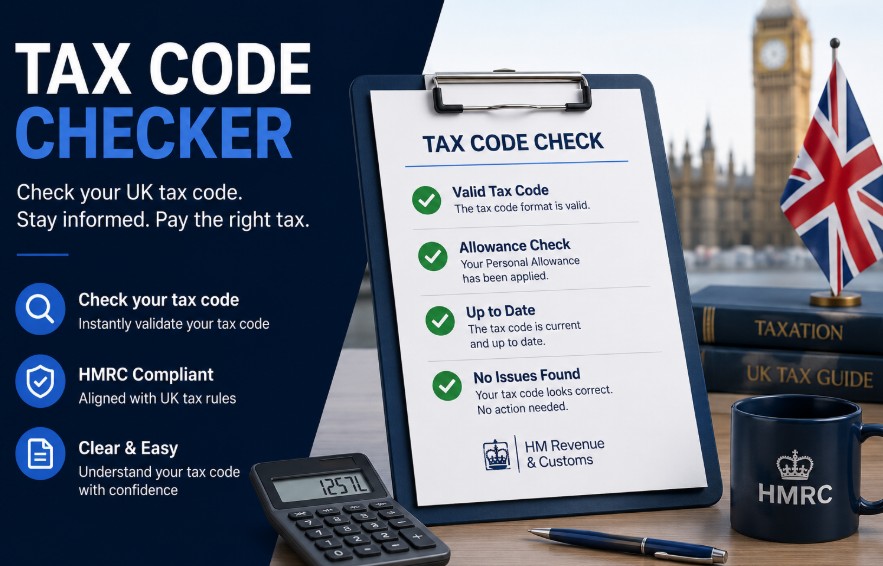
UK Tax Code Checker Guide: How to Verify Your PAYE Code, Fix Errors, and Reclaim Overpaid Tax
A tax code checker is an analytical digital tool that helps UK taxpayers verify whether HM Revenue & Customs (HMRC) is applying their correct Personal Allowance (£12,570) to PAYE income.
Checking your tax code regularly prevents overpaid income tax, stops unexpected tax debts, and ensures your monthly net take-home pay stays accurate.
Key Takeaways
- Checking your tax code regularly prevents unexpected tax bills and ensures you never pay more income tax than legally required under the PAYE system.
- The standard tax code for most individuals with a single income source is 1257L, which corresponds to the current personal allowance of £12570.
- You can view your live tax code instantly online by logging into your official HMRC personal tax account through the secure government gateway.
- If your employer applies an emergency tax code like W1 or M1, your earnings may be temporarily overtaxed until HMRC updates your employment records.
What Is a UK Tax Code?
A UK tax code is a combination of numbers and letters used by employers and pension providers to calculate the exact amount of Income Tax to deduct under the Pay As You Earn (PAYE) system. The numbers indicate tax-free allowances, while the letters signal personal circumstances.
A tax code is a critical sequence of digits and letters assigned by HM Revenue & Customs (HMRC). Understanding your tax code prevents confusion when your monthly take-home pay fluctuates unexpectedly.
-
The Numbers: Multiply the number in your code by 10 to determine your total tax-free annual allowance (e.g., 1257 = £12,570).
-
The Letters: Modify or explain how that allowance applies based on secondary jobs, state benefits, or civil status.
If these figures fail to reflect your actual earnings, you risk quietly accumulating tax arrears or facing unexpected hits to your monthly pay packet.
Why Does Your Tax Code Matter?
According to official HM Revenue & Customs (HMRC) guidelines, tax codes are calculated automatically using income figures submitted by employers, pension providers, and individual taxpayers.
Whenever your employment circumstances change, such as receiving a salary raise, starting a new job, or picking up a company benefit, HMRC issues a revised coding notice to update your payroll deductions.
However, administrative lags can cause delays, leaving individuals on temporary or emergency codes that fail to reflect their true financial position.
Over 8 million UK taxpayers are placed on the standard 1257L tax code each year, granting a tax-free Personal Allowance of £12,570 under standard PAYE rules.
| Component | Function in Tax Code | Practical Effect on Pay |
| Numerical Value | Represents tax-free allowance | Determines how much you earn before tax applies |
| Prefix Letters | Indicates regional or special status | Applies Scottish (S), Welsh (C), or negative (K) tax bands |
| Suffix Letters | Specifies personal circumstances | Instructs payroll on marriage allowances (M/N) or single-job status (L) |
Why Use a Tax Code Checker?
You should use a tax code checker to get instant, clear diagnostic visibility into your payroll deductions without calculating complex tax brackets manually. A tax code checker highlights tax overpayments for immediate refund requests and flags underpayments before arrears accumulate.
Automated tax code checkers simplify tax management by checking your payslip figures against official legislative rules:
-
Prevent Costly Tax Arrears: If HMRC accidentally gives you too much tax-free allowance, you will accumulate unpaid tax debts that HMRC will later recover directly from your salary or via a P800 demand.
-
Reclaim Overpaid Income Tax: Being placed on an incorrect tax code often means paying too much tax each month. A tax code checker highlights overpayments so you can request a swift refund.
-
Budget Comfortably: Identifying errors early avoids abrupt fluctuations in your monthly take-home pay when HMRC retroactively corrects your file.
How Does a Tax Code Checker Work?
A tax code checker works by cross-referencing your assigned tax code and gross earnings against current HMRC legislative rules, personal allowance thresholds, and regional tax brackets. It simulates what your net pay should be versus what is currently being withheld.
Digital calculation tools run your payroll data through a four-step diagnostic process:
-
Input Tax Code & Earnings: You enter your assigned tax code alongside your annual salary or gross pay for a given pay period.
-
Allowance Calculation: The checker translates the numerical part of the code into your annual tax-free allowance (e.g., 1257 = £12,570).
-
Regional & Rule Adjustments: The software checks prefix and suffix letters to apply national brackets (such as Scottish Income Tax rates for s codes) or adjust for Marriage Allowance additions/deductions (M or N).
-
Comparison & Diagnostics: The tool simulates what your net pay should be under standard rules versus what is being withheld, flagging potential emergency codes, missing personal allowances, or unexpected tax bands.
Comprehensive List of Tax Codes
UK tax codes cover standard allowances (1257L), basic rate second jobs (BR), zero allowances (0T), negative allowance perks (K codes), emergency tags (W1/M1), and regional prefixes (S for Scotland, C for Wales). Each code instructs payroll on precise tax withholding rules.
Navigating letter combinations requires a structured reference guide to verify whether your payslip deductions are accurate.
| Tax Code | Category Description | Practical Taxpayer Implication |
| 1257L | Standard Personal Allowance | Standard code for one job, granting £12,570 tax-free annual income. |
| BR | Basic Rate Tax (20%) | All earnings from this source are taxed at 20% with zero tax-free allowance. |
| D0 | Higher Rate Tax (40%) | All earnings from this job or pension are taxed at 40%. |
| D1 | Additional Rate Tax (45%) | All earnings from this job or pension are taxed at 45%. |
| 0T | Zero Allowance Code | Personal allowance is fully used or details are missing; all income is taxed across standard bands. |
| K Codes | Negative Allowances | Untaxed income or company perks exceed your allowance; extra tax is deducted from pay. |
| M / N | Marriage Allowance | M: You received 10% transferred allowance. N: You transferred 10% allowance to your partner. |
| W1 / M1 / X | Emergency Tax Codes | Tax is calculated only on current pay period earnings, ignoring earlier tax-year history. |
Scottish Tax Codes
If you live in Scotland, your income tax rates are determined by the Scottish Parliament, which applies different tax brackets and percentage rates than the rest of the UK.
Scottish tax codes are identified by the prefix S placed before the standard numbers:
-
S1257L: Standard code for Scottish residents entitled to the full £12,570 personal allowance. Earnings above the allowance are taxed across Scottish bands (Starter, Basic, Intermediate, Higher, Advanced, and Top rates).
-
SBR: Taxes all income from a job or pension at the Scottish Basic Rate (20%) without personal allowances.
-
SD0: Taxes all income from a source at the Scottish Intermediate Rate (21%).
-
SD1: Taxes all income from a source at the Scottish Higher Rate (42%).
-
SD2: Taxes all income from a source at the Scottish Advanced Rate (45%).
-
SD3: Taxes all income from a source at the Scottish Top Rate (48%).
Note: HMRC determines whether you get an S code based on your main place of residence, not where your employer is physically located.
How Do I See the Tax Code on My Financial Documents?
You can find your tax code printed on your official employer documents, including monthly payslips, your end-of-year P60 statement, P45 leaving paperwork, or formal P2 PAYE Coding Notices sent directly by HMRC.
Employers and pension administrators are legally required to display your active tax code on routine payroll documents:
-
Payslips: Printed near the top, usually adjacent to your National Insurance number and Payroll ID.
-
Form P2 (PAYE Coding Notice): Issued formally by HMRC whenever your tax code changes.
-
Form P60: Issued at the end of every tax year showing total pay and tax deducted.
-
Form P45: Given by your employer when you leave a job, displaying the active code used on your final pay.
How Can I Check My Tax Code Using Official Government Tools?
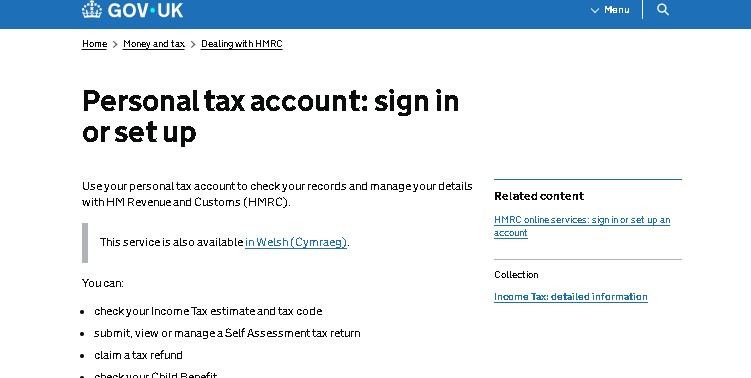
You can check your official tax code online by logging into the GOV.UK Personal Tax Account or using the official HMRC mobile app. Once authenticated via Government Gateway, navigate to the PAYE tab to review active employment records and assigned codes.
Follow these step-by-step instructions to verify your official tax code online:
-
Open the official HM Revenue and Customs mobile application or navigate to the GOV.UK portal using a secure web browser.
-
Sign in to your digital profile using your Government Gateway credentials, entering your user ID and password.
-
Complete any required multi-factor authentication steps, such as entering a security code sent via SMS or authenticating via an app.
-
Locate and select the option to view your current Income Tax summary or PAYE employment history dashboard.
-
Review the active tax codes listed for each individual employer or private pension provider currently registered to your name.
-
Compare the displayed tax codes against your latest payslip to confirm alignment and identify any discrepancies.
-
Report any outdated employment details or missing income streams directly through the online interface to prompt an automatic recalculation.
What Are the Most Common Reasons for an Incorrect Tax Code?
The most common reasons for an incorrect tax code are changing jobs without providing a P45, having multiple jobs or pensions, starting or ending taxable company benefits, moving between UK nations, or earning over £100,000 where personal allowances taper off.
-
Changing Jobs or Employers: If your previous employer delays issuing your Form P45, your new employer may put you on an emergency code (e.g., 1257L W1 or M1) or a zero-allowance code (0T).
-
Having Multiple Jobs or Pensions: Personal allowance can only be applied to one job. If HMRC misallocates your £12,570 allowance to the wrong employment, you will underpay or overpay tax.
-
Changes in State Benefits or Company Perks: Receiving company benefits (such as a company car, medical insurance, or taxable expenses) reduces your tax-free allowance. If perks end or start without HMRC updating records, your code will be wrong.
-
Moving Between UK Nations: Moving to or from Scotland without updating your address on GOV.UK leaves you with an incorrect tax prefix.
-
Income Exceeding £100,000: For every £2 earned over £100,000, your personal allowance drops by £1. If HMRC isn’t informed of salary increases promptly, your code won’t reflect this taper.
How to Correct the Tax Code?
You can correct an incorrect tax code by updating your details online through your GOV.UK Personal Tax Account, using the Tell HMRC About a Change digital tool, calling the HMRC Income Tax helpline (0300 200 3300), or notifying your payroll department once a new Form P6 is issued.
If you spot an error on your payslip or checker diagnostic, follow these correction steps:
-
Update Details via Personal Tax Account: Log into your HMRC online personal account or the official HMRC App. Under the Pay As You Earn (PAYE) tab, update your current employment details, remove past benefits, or update your residential address.
-
Use the Tell HMRC About a Change Tool: Submit changes to company benefits, secondary job status, or estimated income directly on GOV.UK. HMRC will recalculate your tax-free allowance automatically.
-
Contact HMRC Directly: Call the HMRC Income Tax helpline (0300 200 3300) if your issue involves complex back-dated arrears or disputed codes.
-
Notify Your Employer’s Payroll Department: Once HMRC updates your code, they send a digital update (Form P6) directly to your employer. Double-check your following payslip to ensure payroll has applied the new instruction.
| Resolution Method | Operational Speed | Best Used For |
| Personal Tax Account Online | Instant / Same Day | Simple job updates, reporting benefits, checking current codes |
| HMRC Telephone Helpline | 3 to 10 Business Days | Complex queries, disputed arrears, historical refund claims |
| Formal Written Correspondence | 4 to 8 Weeks | Detailed appeals, formal tax review requests |
Conclusion
Reviewing your tax code regularly safeguards your personal finances against unexpected adjustments and ensures accurate PAYE deductions.
To verify your current standing, log in to your GOV.UK personal tax account or open the official HMRC mobile application.
Cross-reference your active codes against your latest payslip and report any discrepancies immediately to prevent financial surprises.
Disclaimer: This article provides general administrative information regarding UK PAYE tax codes and does not constitute formal tax or financial advice; please consult HMRC or a certified accountant for specific personal tax advice.
FAQ
How do I know my tax identification number in the UK?
The UK does not use a single universal tax identification number for individuals. Instead, your National Insurance number serves as your primary reference for tax and social security matters.
Is my UK tax number my NI number?
No. Your National Insurance number tracks your contributions for state benefits and pensions, while your tax code governs how much Income Tax is deducted from your earnings.
What is the lowest tax code in the UK?
A K code represents the lowest effective tax standing, where negative allowances apply because untaxed income or previous arrears exceed your standard personal allowance threshold.
How do I get a tax number in the UK?
You receive a National Insurance number automatically around your sixteenth birthday if you live in the UK, or by applying through official government channels if you move from abroad.
How much tax should I pay in the UK?
Income tax depends on your total taxable earnings, broken into bands: the personal allowance (£12,570), basic rate (20%), higher rate (40%), and additional rate (45%).
What is the official Income Tax website?
The official government portal for managing all UK tax affairs, checking codes, and accessing your personal account is GOV.UK, managed by HM Revenue and Customs.
Can I speak to a real person at HMRC?
Yes. You can reach HMRC advisors by calling their dedicated telephone helplines during operational hours, though digital self-service channels often resolve routine queries faster.
How can I see my tax return online?
You can view past tax returns, submissions, and calculation histories by signing into your Self Assessment or Personal Tax Account dashboard using your Government Gateway credentials.




One Comment